The Focusrite Scarlett 2i2 4th Gen is my best overall USB audio interface here, balancing two recording inputs, flexible controls, and broad usefulness for home recording. The Audient iD4 MKII is a strong alternative for a solo musician who values its instrument input and headphone monitoring, while the Focusrite Scarlett 18i20 4th Gen suits studios that need many connections. The main tradeoff is choosing between a simple, portable two-input unit and a larger interface with room for more sources, along with deciding whether built-in processing is worth prioritizing. This lineup also includes dedicated podcast and XLR-microphone options that solve narrower needs better than a general-purpose interface. Read on for the full breakdown and a guide to matching inputs, controls, and connectivity to your setup.

Get audio and creator gear delivered free with Prime
- Fast, free delivery on millions of items
- Prime Video, Amazon Music and more included
- Member-only deals all year
Complete the kit



Key Takeaways
- The Scarlett 2i2 4th Gen is the most balanced choice: its two-input format fits many music and creator setups without the footprint or complexity of the Scarlett 18i20.
- Input count matters more than headline sample-rate figures: the M-Track Solo and Duo are basic entry points, while the 18i20 is built for recording several sources at once.
- Specialized interfaces solve different problems: the Vocaster One is podcast-focused, and the Shure MVX2U Gen 2 is specifically for connecting an XLR microphone to a USB-C setup.
- Built-in processing separates the Volt models: the Volt 176 and 276 add compression-oriented controls, while the Volt 2 keeps the setup simpler.
- A low-cost or compact pick can mean fewer workflow options: models such as the PIYONE Q28 and MAONO PS22 Lite may fit modest setups, but buyers should check compatibility, monitoring, and control needs before choosing them over established recording-focused options.
| Focusrite Scarlett 2i2 4th Gen USB-C Audio Interface |  | Best Overall | Connectivity: USB | Channels: 2 | Microphone preamps: 2 | VIEW LATEST PRICE | See Our Full Breakdown |
| Audient iD4 MKII USB-C Audio Interface |  | Best for Headphone Monitoring | Channels: 2 | Microphone preamp: Class A | Connectivity: USB-C | VIEW LATEST PRICE | See Our Full Breakdown |
| Focusrite Vocaster One Podcasting USB Audio Interface | 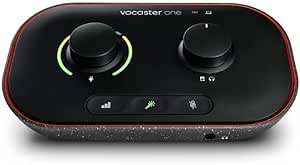 | Best for Solo Podcasters | Channels: 1 | Connectivity: USB | Audio input: Microphone | VIEW LATEST PRICE | See Our Full Breakdown |
| Universal Audio Volt 276 USB Audio Interface |  | Best for Built-In Dynamics Processing | Channels: 2-in / 2-out | Connectivity: USB-C | Maximum sample rate: 192 kHz | VIEW LATEST PRICE | See Our Full Breakdown |
| M-Audio M-Track Duo USB Audio Interface |  | Best Budget-Friendly Starter Setup | Audio resolution: 48 kHz | Inputs: 2 combo XLR/Line/Instrument | Preamps: Crystal Preamps with phantom power | VIEW LATEST PRICE | See Our Full Breakdown |
| Shure MVX2U Gen 2 XLR-to-USB-C Audio Interface |  | Best for Single-Mic Mobile Recording | Channels: 1 | Input: XLR | Connectivity: USB-C | VIEW LATEST PRICE | See Our Full Breakdown |
| Focusrite Scarlett Solo 3rd Gen USB-C Audio Interface |  | Best for Beginner Vocal-and-Instrument Recording | Channels: 2 | Inputs: XLR and instrument | Outputs: 2 balanced outputs | VIEW LATEST PRICE | See Our Full Breakdown |
| Universal Audio Volt 176 USB Audio Interface |  | Best for One-Channel Dynamics Processing | Inputs/outputs: 1-in/2-out | Connectivity: USB | Maximum sample rate: 192 kHz | VIEW LATEST PRICE | See Our Full Breakdown |
| Universal Audio Volt 2 USB Audio Interface |  | Best for Two-Source Recording with UA Character | Channels: 2-in/2-out | Connectivity: USB-C | Recording resolution: 24-bit | VIEW LATEST PRICE | See Our Full Breakdown |
| Mackie Onyx Artist 1.2 USB Audio Interface |  | Best for Bus-Powered Direct Monitoring | Inputs/outputs: 2 in × 2 out | Recording resolution: 24-bit/192 kHz | Microphone preamp: Onyx mic preamp | VIEW LATEST PRICE | See Our Full Breakdown |
| Focusrite Scarlett Solo 4th Gen USB-C Audio Interface |  | Best for Solo Recording | Channels: 2 | Microphone inputs: 1 XLR preamp | Instrument inputs: 1 Hi-Z input | VIEW LATEST PRICE | See Our Full Breakdown |
| M-Audio M-Track Solo USB Audio Interface |  | Best for a Simple Starter Setup | Audio resolution: 48 kHz | Inputs: One combo XLR/line input with phantom power; one switchable line/instrument input | Monitoring outputs: Stereo RCA outputs and 1/8-inch headphone output | VIEW LATEST PRICE | See Our Full Breakdown |
| PIYONE Q28 2-Channel USB-C Audio Interface, 24-bit/192 kHz |  | Best for Two-Input USB-C Recording | Channels: 2 | Connectivity: USB-C | Inputs: 2 XLR/TRS combo inputs | VIEW LATEST PRICE | See Our Full Breakdown |
| Focusrite Scarlett 18i20 4th Gen USB-C Audio Interface |  | Best for Larger Project Studios | Inputs/outputs: 18 inputs, 20 outputs | Microphone preamps: 8 | Preamplifier gain: 69 dB | VIEW LATEST PRICE | See Our Full Breakdown |
| MAONO PS22 Lite USB Audio Interface |  | Best for Streaming and Loopback | Channels: 2 | Maximum recording resolution: 24-bit/192 kHz | Dynamic range: 106 dB | VIEW LATEST PRICE | See Our Full Breakdown |
| USB audio interface | Connectivity | Weight | Channels | Maximum sample rate |
|---|---|---|---|---|
| Focusrite Scarlett 2i2 4th Gen | USB | 1.7 lb | 2 | 192 kHz |
| Audient iD4 MKII USB-C Audio I | USB-C | 740 g | 2 | 96 kHz |
| Focusrite Vocaster One Podcast | USB | 349 g | 1 | 48 kHz |
| Universal Audio Volt 276 USB A | USB-C | 790 g | 2-in / 2-out | 192 kHz |
| M-Audio M-Track Duo USB Audio | — | — | — | — |
| Shure MVX2U Gen 2 XLR-to-USB-C | USB-C | 100 g | 1 | 192 kHz |
| Focusrite Scarlett Solo 3rd Ge | USB | 12.32 oz | 2 | 192 kHz |
| Universal Audio Volt 176 USB A | USB | 653 g | — | 192 kHz |
| Universal Audio Volt 2 USB Aud | USB-C | 650 g | 2-in/2-out | 192 kHz |
| Mackie Onyx Artist 1.2 USB Aud | — | 1.2 lb | — | — |
| Focusrite Scarlett Solo 4th Ge | USB | — | 2 | — |
| M-Audio M-Track Solo USB Audio | — | — | — | — |
| PIYONE Q28 2-Channel USB-C Aud | USB-C | 0.74 kg | 2 | — |
| Focusrite Scarlett 18i20 4th G | USB-C, Hi-Z, line, ADAT, S/PDIF, MIDI I/O, Word Clock | 8 lb | — | — |
| MAONO PS22 Lite USB Audio Inte | USB | 0.43 kg | 2 | — |
More Details on Our Top Picks
Focusrite Scarlett 2i2 4th Gen USB-C Audio Interface
The Scarlett 2i2 4th Gen is my most versatile pick for a small recording setup: its two mic preamps and two Hi-Z inputs let you record a pair of microphones, two instruments, or a voice-and-guitar arrangement without swapping connections. Auto Gain and Clip Safe can help keep recording levels usable when input levels change, while Air mode offers another way to shape vocal and instrument presence. Compared with the Audient iD4 MKII, the 2i2 offers a higher stated sample rate and more explicit level-assistance features; the Audient counters with two headphone outputs and an all-metal housing. The tradeoff is that this is still a two-channel interface, and it depends on a connected device and compatible recording software. Its broad feature set makes it a strong all-rounder, not a substitute for an interface with more inputs.
Pros:- Two microphone preamps and two Hi-Z instrument inputs support flexible two-source recording.
- Auto Gain and Clip Safe help manage recording levels.
- Air mode provides an alternate tonal character for recordings.
- Recording software and plugins are included.
Cons:- Two channels limit simultaneous recording capacity.
- Requires a connected device and compatible recording software to use.
Best for: Home musicians and singer-songwriters who want to record two microphones or instruments at once, with level-assistance tools for a straightforward session.
Not ideal for: Bands recording several performers simultaneously or buyers who need more than two channels; consider a larger interface such as the Focusrite Scarlett 18i20 4th Gen.
- Connectivity:USB
- Channels:2
- Microphone preamps:2
- Instrument inputs:2 Hi-Z
- Maximum sample rate:192 kHz
- Bit depth:24-bit
- Dynamic range:120 dB
- Weight:1.7 lb
Our verdict“Choose the Scarlett 2i2 4th Gen for a flexible two-input studio setup with helpful recording controls; skip it if you need more channels.”
Audient iD4 MKII USB-C Audio Interface
The Audient iD4 MKII suits a compact desk or portable setup where headphone monitoring matters: it has two headphone outputs, monitor mix and panning controls, and a Class A microphone preamp in an all-metal enclosure. Those two headphone connections give a musician and collaborator a direct way to monitor together, a useful distinction from the Scarlett 2i2, whose supplied details emphasize level-assistance tools and a higher maximum sample rate instead. The iD4 is limited to two channels, so it is for focused voice, instrument, or small overdub sessions rather than multi-mic recording. Its 96 kHz maximum sample rate is also lower than the Scarlett 2i2 4th Gen and Universal Audio Volt 276. I’d choose it for its monitoring layout and solid construction, not for the biggest feature count.
Pros:- Two headphone outputs support shared monitoring.
- Class A microphone preamp.
- Monitor mix and panning controls aid listening setup.
- Compact all-metal housing.
Cons:- Limited to two channels.
- Maximum sample rate of 96 kHz is lower than several alternatives in this roundup.
Best for: Solo musicians and small recording partnerships who want two headphone outputs and monitor-mix control in a compact interface.
Not ideal for: Buyers who need more than two recording channels or prioritize a 192 kHz maximum sample rate; the Scarlett 2i2 4th Gen and Volt 276 support higher rates.
- Channels:2
- Microphone preamp:Class A
- Connectivity:USB-C
- Maximum sample rate:96 kHz
- Headphone outputs:2
- Compatible devices:Mac, PC, iOS
- Housing:All-metal
- Weight:740 g
Our verdict“Pick the iD4 MKII if shared headphone monitoring and a metal build matter more to you than extra channels or a higher sample rate.”
Focusrite Vocaster One Podcasting USB Audio Interface
The Vocaster One is built around a specific job: getting one person’s voice into a podcast or stream with minimal setup. Its single XLR microphone input offers over 70 dB of gain, and Auto Gain, four voice presets, and a dedicated mute button put common spoken-word controls close at hand. Phone and camera connections plus stereo loopback also make it more tailored to mixed-source content than a general two-input interface. By comparison, the Scarlett 2i2 4th Gen can record two microphone or instrument sources and supports up to 192 kHz, while the Vocaster One focuses on a one-person workflow and tops out at 48 kHz. That one-channel design is its main limit: it is a poor fit for interviews with two local microphones or music sessions. Choose it for solo voice production, not growth into multi-mic recording.
Pros:- More than 70 dB of gain for XLR microphones.
- Auto Gain and four voice presets simplify spoken-word setup.
- Phone, camera, and stereo loopback connections suit podcast and streaming workflows.
- Dedicated mute button provides direct microphone control.
Cons:- Single channel limits recording to one input source at a time.
- Maximum sample rate is 48 kHz, below the music-focused Scarlett 2i2 4th Gen and Volt 276.
Best for: Solo podcasters and streamers who record one XLR microphone and want voice presets, mute control, and phone or camera connections.
Not ideal for: Interview hosts recording multiple microphones at once, or musicians needing instrument inputs; the Scarlett 2i2 4th Gen supports two channels and instrument recording.
- Channels:1
- Connectivity:USB
- Audio input:Microphone
- Maximum sample rate:48 kHz
- Frequency response:20 kHz
- Operating systems:Mac OS, Windows OS, iOS
- Weight:349 g
- Included components:Vocaster One, USB A-C cable
Our verdict“Choose the Vocaster One for a streamlined solo podcast or stream, but pick a two-channel interface for guest microphones or music recording.”
Universal Audio Volt 276 USB Audio Interface
The Universal Audio Volt 276 is the pick for recording workflows that benefit from hands-on character and dynamics control: its vintage mic preamp and analog 1176-style compressor offer sound-shaping options at the interface, while the included LUNA DAW and UAD plug-ins give software users a broad starting point. Like the Scarlett 2i2 4th Gen, it records at up to 192 kHz over two inputs, but the Volt’s signature draw is its analog processing and bundled UA software rather than the Scarlett’s Auto Gain and Clip Safe features. The two-in/two-out design keeps it suited to small sessions, not expanded tracking. It also has a shorter stated warranty than the three-year options listed here, and some iOS setups need an external power supply and Lightning adapter. Choose the Volt for its processing and software ecosystem, not a larger input count.
Pros:- Vintage mic preamp and 1176-style analog compressor provide built-in sound shaping.
- LUNA DAW and a suite of UAD plug-ins are included.
- Supports recording up to 192 kHz.
- USB-C compatibility includes Mac, Windows, iPad, and iPhone.
Cons:- Two inputs and two outputs limit larger recording setups.
- Some iOS devices require an external power supply and Lightning-to-USB adapter.
- One-year manufacturer warranty is shorter than the three-year terms listed for several alternatives.
Best for: Home producers and vocalists who want analog-style compression at the interface, bundled UA software, and a two-input recording format.
Not ideal for: Buyers seeking more than two inputs, built-in MIDI I/O, or a simple iOS setup without extra power and adapter needs.
- Channels:2-in / 2-out
- Connectivity:USB-C
- Maximum sample rate:192 kHz
- Operating system compatibility:macOS, Windows, iPadOS, iPhoneOS
- Supported software:Ableton, Melodyne, Virtual Drummer, Marshall, Ampeg, LUNA DAW, UAD plug-ins
- Dimensions:4.69 × 7.24 × 2.64 in
- Weight:790 g
- Warranty:1 year manufacturer
Our verdict“Choose the Volt 276 for its analog-style compression and bundled UA production tools, provided two inputs are enough for your sessions.”
M-Audio M-Track Duo USB Audio Interface
The M-Audio M-Track Duo is a practical entry point for recording two sources without adding a separate power supply: it is USB-powered, has two combo inputs for microphone, line, or instrument signals, and offers zero-latency direct monitoring. Phantom power supports condenser microphones, while included MPC Beats provides a starting point for music production. Compared with the Focusrite Scarlett 2i2 4th Gen, the M-Track Duo is simpler and limited to 48 kHz rather than 192 kHz; the Scarlett also adds Auto Gain, Clip Safe, and Air mode. The M-Track’s strength is straightforward two-source connectivity, not advanced recording controls or high-resolution capture. Its listed iOS compatibility also depends on a separate Lightning to USB 3 Camera Adapter, and the headphone output may call for a 1/4-inch adapter. It fits basic home recording and streaming better than demanding production setups.
Pros:- Two combo inputs accept microphone, line-level, and instrument sources.
- Phantom power supports condenser microphones.
- USB-powered design is convenient for portable recording.
- Zero-latency direct monitoring and MPC Beats are included.
Cons:- 48 kHz audio resolution is lower than the 192 kHz support on the Scarlett 2i2 4th Gen and Volt 276.
- iOS use requires a separate Lightning to USB 3 Camera Adapter.
- The headphone output may require a 1/4-inch adapter.
Best for: First-time home recordists, streamers, and musicians who need two flexible inputs, direct monitoring, and USB-powered portability.
Not ideal for: Producers who need higher sample rates, advanced level-management features, or uncomplicated iOS connection; the Scarlett 2i2 4th Gen offers more recording controls and higher-rate support.
- Audio resolution:48 kHz
- Inputs:2 combo XLR/Line/Instrument
- Preamps:Crystal Preamps with phantom power
- Outputs:Stereo 1/4-inch outputs and 1/4-inch headphone output
- Monitoring:Zero-latency direct monitoring with USB/Direct switch
- Power:USB-powered
- Supported software:Ableton Live Lite, MPC Beats; compatible with major DAWs
- Compatibility:Windows 7–10, macOS High Sierra–Big Sur, iOS with Lightning to USB 3 Camera Adapter
Our verdict“Choose the M-Track Duo for a simple, portable two-input starter setup, but move up if you need higher-resolution recording or more onboard controls.”
Shure MVX2U Gen 2 XLR-to-USB-C Audio Interface
The Shure MVX2U Gen 2 is the most streamlined pick here for recording with one XLR microphone: it connects directly to a USB-C device, avoiding the larger desktop footprint of the Focusrite Scarlett Solo 3rd Gen. Its +60 dB gain and 48 V phantom power accommodate dynamic and condenser mics, while onboard Auto Level, Denoiser, and Popper Stopper can help manage common recording problems without adding separate gear. MFi certification and support for phones, tablets, and computers make it especially suited to portable voice work. The tradeoff is a firm one-channel limit and few physical controls; the Scarlett Solo offers instrument input and hands-on level metering, while this Shure relies more on software adjustments. Choose it for a compact mic connection, not a flexible recording hub.
Pros:- Compact USB-C XLR connection works with a broad range of supported phones, tablets, and computers.
- Up to +60 dB gain and 48 V phantom power support dynamic and condenser microphones.
- Auto Level, Real-Time Denoiser, and Digital Popper Stopper provide onboard processing.
- MFi certification supports compatible Apple mobile devices.
Cons:- One XLR channel cannot record multiple microphones at once.
- Limited physical controls mean gain and tone adjustments depend on software.
Best for: Solo podcasters, streamers, and mobile creators who already own an XLR microphone and want to connect it directly to a USB-C phone, tablet, or computer.
Not ideal for: Musicians recording vocals and instruments together, or anyone needing multiple microphones, instrument inputs, or substantial hands-on controls.
- Channels:1
- Input:XLR
- Connectivity:USB-C
- Maximum sample rate:192 kHz
- Gain:Up to +60 dB
- Phantom power:48 V
- Compatible devices:Microphones, PCs, smartphones, and tablets; iOS, Android, Windows, and macOS
- MFi certified:Yes
- Weight:100 g
Our verdict“Pick the MVX2U Gen 2 for a compact, processed single-microphone setup; choose the Scarlett Solo instead if you also need an instrument input and physical metering.”
Focusrite Scarlett Solo 3rd Gen USB-C Audio Interface
The Scarlett Solo 3rd Gen suits a beginner building a simple home-recording setup around one microphone and one guitar or bass. Its XLR and instrument inputs make that combination possible, while Gain Halo metering gives a clear visual cue when setting levels. The switchable Air mode offers a way to add presence to vocals and acoustic sources, and the included recording software and plug-ins give new users tools to start with. Compared with the Shure MVX2U Gen 2, this is less convenient as a direct-to-phone XLR adapter, but more useful for a desk setup that also records instruments. It still has just one microphone preamp, so two vocalists cannot record separately. The bundled software also requires registration and download, adding a setup step before recording.
Pros:- XLR microphone and instrument inputs support common solo recording setups.
- Gain Halo metering helps users set input levels.
- Switchable Air mode can add presence to vocals and acoustic recordings.
- Includes recording software and studio plug-ins.
Cons:- Only one microphone preamp limits separate multi-mic recording.
- Included software requires registration and download.
- The supplied operating-system compatibility includes Mac, Windows, and iOS, but the listing does not specify a mobile connection method.
Best for: First-time home recordists who want to track one vocalist or microphone alongside a guitar or bass on a Mac or PC.
Not ideal for: Two-microphone podcast teams or mobile-first creators seeking a direct, compact XLR-to-phone adapter.
- Channels:2
- Inputs:XLR and instrument
- Outputs:2 balanced outputs
- Recording resolution:24-bit
- Maximum sample rate:192 kHz
- Connectivity:USB
- Dimensions:1.71 × 5.65 × 3.77 in
- Weight:12.32 oz
- Warranty:3 years
Our verdict“Choose the Scarlett Solo 3rd Gen for a straightforward first interface that records a mic and instrument, but skip it if your setup needs multiple mic preamps.”
Universal Audio Volt 176 USB Audio Interface
The Universal Audio Volt 176 separates itself from simpler one-input interfaces with two forms of onboard character: a Vintage Mic Preamp mode and an analog compressor based on the UA 1176. That combination can help a solo vocalist or speaker shape a more controlled signal while recording, rather than relying only on processing afterward. It records at up to 192 kHz and includes a DAW and UAD plug-ins, giving a new setup a useful software starting point. Compared with the Volt 2, the 176 trades the second input for its built-in compressor; that makes it a more focused choice for one featured source, not a better fit for two simultaneous microphones or instruments. Mobile use is supported, though iPhone and some iPad configurations may need an external power supply and adapter.
Pros:- Built-in analog compressor can control dynamics during recording.
- Vintage Mic Preamp mode adds an alternative input character.
- Portable 1-in/2-out format supports focused recording setups.
- Includes a DAW and UAD plug-ins and instruments.
Cons:- One input cannot capture two separate sources at once.
- Some iPhone and iPad setups require an external power supply and adapter.
- The one-year warranty is shorter than the Scarlett Solo 3rd Gen’s three-year warranty.
Best for: Solo vocalists, podcasters, and streamers who want a single input with onboard compression and preamp voicing.
Not ideal for: Duos or musicians who need to record two sources simultaneously, or mobile users who want to avoid extra power and adapter requirements.
- Inputs/outputs:1-in/2-out
- Connectivity:USB
- Maximum sample rate:192 kHz
- Built-in processing:Vintage Mic Preamp mode and analog compressor based on the UA 1176
- Compatible devices:Computer, laptop, tablet, and smartphone
- Operating systems:Windows, macOS, iPadOS, and iOS
- Weight:653 g
- Warranty:1 year
Our verdict“Choose the Volt 176 if its onboard compressor matters more than a second input; pick the Volt 2 for recording two sources together.”
Universal Audio Volt 2 USB Audio Interface
The Universal Audio Volt 2 is a practical step up from the one-input Volt 176 when a recording requires two sources at once. Its 2-in/2-out layout suits a pair of microphones or a mic-and-instrument setup, and the Vintage Mic Preamp mode provides UA’s 610-style voicing as an optional color. Support for up to 24-bit/192 kHz recording, MIDI, and bundled UAD plug-ins and the LUNA DAW broaden its use beyond a basic voice interface. The tradeoff against the Volt 176 is the missing built-in analog compressor, so it does not offer the same onboard dynamics control. Its mobile compatibility is useful, but iOS connections may call for an external power supply and Lightning-to-USB adapter. With only two inputs and outputs, it is aimed at small rigs rather than growing multitrack studios.
Pros:- Two inputs allow two sources to be recorded at the same time.
- Vintage Mic Preamp mode emulates the UA 610 tube preamp.
- Records up to 24-bit/192 kHz and includes MIDI.
- Includes UAD plug-ins and the LUNA DAW.
Cons:- No built-in analog compressor, unlike the Volt 176.
- iOS use may require an external power supply and Lightning-to-USB adapter.
- Two inputs and two outputs limit expansion for larger recording setups.
Best for: Small home studios recording two microphones or a microphone and instrument, especially users who want UA preamp voicing and bundled software.
Not ideal for: Creators who need onboard compression, more than two simultaneous inputs, or a simple adapter-free iOS setup.
- Channels:2-in/2-out
- Connectivity:USB-C
- Recording resolution:24-bit
- Maximum sample rate:192 kHz
- MIDI:Yes
- Operating systems:Windows, macOS, and iOS
- Dimensions:5.12 × 6.85 × 2.09 in
- Weight:650 g
- Warranty:1 year manufacturer
Our verdict“Pick the Volt 2 for two-source recording with UA preamp voicing; choose the Volt 176 if one input plus onboard compression better matches your sessions.”
Mackie Onyx Artist 1.2 USB Audio Interface
The Mackie Onyx Artist 1.2 keeps a compact recording setup simple: it is bus-powered, has an Onyx mic preamp with 48 V phantom power, and provides zero-latency direct monitoring so performers can hear their input without relying on the computer’s monitoring path. Its instrument input includes a Hi-Z switch, making it useful for a basic mic-and-guitar workflow. Compared with the Focusrite Scarlett Solo 3rd Gen, it shares the one-microphone-preamp limitation but emphasizes direct monitoring and a bus-powered setup rather than bundled recording software and Air mode. The 24-bit/192 kHz capability is ample for detailed home recording, yet the supplied software compatibility information names Windows 10, so buyers should check their system needs. It also offers little room to record multiple microphones at once.
Pros:- Bus-powered design avoids a separate power supply for compatible USB setups.
- Onyx mic preamp and 48 V phantom power support condenser microphones.
- Zero-latency direct monitoring helps performers hear their input while recording.
- Hi-Z instrument input accommodates guitar or bass.
Cons:- Only one microphone preamp prevents simultaneous multi-mic recording.
- The listed compatible software names Windows 10, leaving other software support unclear.
- At 1.2 pounds, it is heavier than the 100 g Shure MVX2U Gen 2 adapter.
Best for: Home recordists and mobile musicians who want a bus-powered interface for one microphone or guitar, with direct input monitoring.
Not ideal for: Multi-microphone sessions or buyers who need clearly specified compatibility beyond the listed Windows 10 software support.
- Inputs/outputs:2 in × 2 out
- Recording resolution:24-bit/192 kHz
- Microphone preamp:Onyx mic preamp
- Phantom power:+48 V
- Instrument input:1/4-inch TRS with Hi-Z switch
- Monitoring:Zero-latency direct monitoring
- Connectivity and power:USB 2.0; bus-powered
- Dimensions:6.4 × 4.4 × 1.9 in
- Weight:1.2 lb
Our verdict“Choose the Onyx Artist 1.2 for a bus-powered mic-or-instrument setup with direct monitoring, but look elsewhere for multiple mic inputs or clearly documented broad software support.”
Focusrite Scarlett Solo 4th Gen USB-C Audio Interface
I’d choose the Scarlett Solo 4th Gen for a singer-songwriter or home recorder who needs one microphone input and one instrument input, not a flexible multi-person setup. Its 24-bit/192 kHz recording and 120 dB dynamic range give it a stronger stated recording specification than the M-Audio M-Track Solo’s 48 kHz resolution, while Air modes offer an optional tonal change for vocals and instruments. The included software bundle also gives a new setup a useful starting point. Its main limitation is the layout: with just one XLR preamp and two channels, it cannot record two microphones at once. Buyers who need that capacity can step up to the Scarlett 18i20, though that model is much larger and built for a studio with several sources.
Pros:- 24-bit/192 kHz recording with a stated 120 dB dynamic range
- Combines one XLR microphone preamp with a Hi-Z instrument input
- Air modes provide optional presence and harmonic character
- Includes several recording programs and plugins
Cons:- Only one microphone input limits simultaneous vocal or group recording
- Two-channel capacity leaves little room for expanding a multi-source setup
Best for: Solo vocalists, guitarists, and home musicians who record one microphone and one instrument at a time.
Not ideal for: Podcasters with multiple guests or bands recording several microphones simultaneously; it has only one microphone preamp.
- Channels:2
- Microphone inputs:1 XLR preamp
- Instrument inputs:1 Hi-Z input
- Maximum recording resolution:24-bit/192 kHz
- Dynamic range:120 dB
- Connectivity:USB
- Compatible operating systems:Mac OS, Windows OS, iOS
- Included software:Pro Tools Intro+, Ableton Live Lite, Cubase LE, Hitmaker Expansion
Our verdict“Choose the Scarlett Solo 4th Gen if you mainly record one voice or instrument at a time and want higher stated recording specifications than the M-Track Solo.”
M-Audio M-Track Solo USB Audio Interface
The M-Track Solo is the straightforward pick for someone who wants to connect a microphone or instrument and begin recording without needing a high-spec workflow. It is USB-powered, compact, and offers direct monitoring, so you can hear an input without the distracting delay that can come from monitoring through recording software. Compared with the Focusrite Scarlett Solo 4th Gen, its 48 kHz resolution is more limited on paper, but its basic input mix covers a similar solo recording job. The M-Track’s RCA outputs may also suit a simple desktop monitoring setup. Its two-channel ceiling and one combo microphone input make it a poor fit for recording multiple microphones, and using it with iOS requires a separate camera adapter.
Pros:- USB-powered design keeps a basic recording setup compact
- Direct monitoring avoids software monitoring delay
- Combo input and switchable line/instrument input accommodate common solo sources
- MPC Beats is included
Cons:- 48 kHz resolution is lower than the 192 kHz maximum listed for the Scarlett Solo 4th Gen and MAONO PS22 Lite
- Only one combo microphone input limits recording multiple vocalists
- iOS connection requires a separate Apple Lightning to USB 3 Camera Adapter
Best for: First-time home recorders and streamers who want a compact interface for one microphone or instrument and uncomplicated direct monitoring.
Not ideal for: Musicians seeking higher sample-rate recording or iOS users who want a direct connection without a separate adapter.
- Audio resolution:48 kHz
- Inputs:One combo XLR/line input with phantom power; one switchable line/instrument input
- Monitoring outputs:Stereo RCA outputs and 1/8-inch headphone output
- Power:USB-powered
- Compatible operating systems:Windows 7–10, macOS High Sierra–Big Sur; iOS with Apple Lightning to USB 3 Camera Adapter
- Included software:MPC Beats
Our verdict“Pick the M-Track Solo for an uncomplicated, USB-powered starter setup, but choose the Scarlett Solo 4th Gen if higher-resolution recording matters more.”
PIYONE Q28 2-Channel USB-C Audio Interface, 24-bit/192 kHz
The PIYONE Q28 stands out among these compact interfaces because its two XLR/TRS combo inputs let you connect two microphones or a microphone and instrument without stepping up to a larger studio unit. It also lists 48V phantom power, Hi-Z support, and direct monitoring, making its input arrangement more flexible than the M-Audio M-Track Solo, which has just one combo microphone input. The stated 24-bit/192 kHz recording matches the maximum listed for the Focusrite Scarlett Solo 4th Gen, but the Q28’s advertised operating-system compatibility specifies Windows only. That makes compatibility the main decision point: I’d shortlist it for a Windows-based two-source setup, but avoid assuming it will work with a Mac or mobile device based on the supplied details.
Pros:- Two XLR/TRS combo inputs support two simultaneous sources
- 48V phantom power and Hi-Z support accommodate microphones and instruments
- Lists recording up to 24-bit/192 kHz
- Direct monitoring and a 3.5 mm headphone jack are built in
Cons:- Listed operating-system compatibility specifies Windows only
- The supplied product details do not establish broader output or routing options
- At 0.74 kg, it is heavier than the compact M-Track Solo
Best for: Windows-based musicians or podcasters who need two combo inputs for two microphones or a mixed microphone-and-instrument recording.
Not ideal for: Mac, iOS, or Android users who need clearly listed compatibility, and buyers seeking a larger set of routing connections.
- Channels:2
- Connectivity:USB-C
- Inputs:2 XLR/TRS combo inputs
- Maximum recording resolution:24-bit/192 kHz
- Phantom power:48V
- Monitoring:Direct zero-latency monitoring
- Headphone jack:3.5 mm
- Operating system:Windows
- Weight:0.74 kg
Our verdict“Choose the Q28 if you need two combo inputs and use Windows, but favor a model with explicitly listed Mac or mobile support if platform compatibility is uncertain.”
Focusrite Scarlett 18i20 4th Gen USB-C Audio Interface
With eight microphone preamps and 18 inputs/20 outputs, the Scarlett 18i20 is the clear choice here for a project studio recording several people or instruments at once. Its ADAT, S/PDIF, MIDI, and Word Clock connections also give a setup room to link external converters and studio hardware—far beyond the needs of someone choosing a two-channel interface like the Scarlett Solo 4th Gen. Focusrite’s Auto Gain and Clip Safe features are aimed at managing levels across sessions, while the 24-bit/192 kHz converters and 122 dB dynamic range support detailed recording. The tradeoff is scale: this is an eight-pound, 17-inch-wide unit that depends on a compatible computer or device over USB. I’d skip it for a single-mic desk setup, where its capacity adds bulk without much benefit.
Pros:- Eight microphone preamps support multi-mic recording
- 18 inputs and 20 outputs, with ADAT, S/PDIF, MIDI I/O, and Word Clock
- 24-bit/192 kHz converters and a stated 122 dB dynamic range
- Auto Gain and Clip Safe assist with recording-level management
Cons:- Eight-pound, 17.37-inch-wide chassis is cumbersome for a compact desktop setup
- Requires a USB connection to a compatible computer or device
- Its extensive capacity is unnecessary for users recording only one or two sources
Best for: Project studios, small bands, and engineers who need several microphone preamps plus digital connections for expandable recording and routing.
Not ideal for: Solo creators with a small desk or a two-source workflow; the 18i20 is physically larger and offers far more connectivity than they need.
- Inputs/outputs:18 inputs, 20 outputs
- Microphone preamps:8
- Preamplifier gain:69 dB
- Converters:24-bit/192 kHz
- Dynamic range:122 dB
- Connectivity:USB-C, Hi-Z, line, ADAT, S/PDIF, MIDI I/O, Word Clock
- Supported operating systems:Mac OS, Windows OS, iOS
- Dimensions:17.37 × 10.21 × 1.83 in
- Weight:8 lb
Our verdict“Buy the Scarlett 18i20 when your studio needs eight microphone preamps and extensive routing; for solo recording, the Scarlett Solo 4th Gen is the more focused fit.”
MAONO PS22 Lite USB Audio Interface
The MAONO PS22 Lite is the most streaming-oriented choice in this group: its ProStudio routing software with loopback can help creators combine computer audio with a microphone or instrument feed, while direct monitoring supports hearing an input as it is recorded. It also offers 24-bit/192 kHz recording and 48V phantom power, giving it a broader stated recording specification than the M-Audio M-Track Solo. Unlike the Scarlett Solo 4th Gen, however, the supplied details do not list an Air-style sound mode or a named recording-software bundle. The PS22 Lite’s broad listed compatibility—including Android, ChromeOS, iOS, macOS, and Windows—is useful for multi-device creators, but setup may require selecting MAONO’s ASIO driver in compatible software. Its two-channel format still limits simultaneous sources.
Pros:- 24-bit/192 kHz recording with 48V phantom power
- ProStudio software provides virtual channels and loopback routing
- Direct monitoring is available
- Lists compatibility with Android, ChromeOS, Windows, iOS, and macOS
Cons:- Two-channel design limits simultaneous recording sources
- Compatible software may require selecting the MAONO ASIO driver
- Warranty duration is not specified in the supplied product details
Best for: Streamers and home creators who want loopback routing, direct monitoring, and compatibility across several desktop and mobile platforms.
Not ideal for: Bands or interview setups needing more than two channels, and users who want the simplest possible driver setup.
- Channels:2
- Maximum recording resolution:24-bit/192 kHz
- Dynamic range:106 dB
- Microphone preamp gain:Up to 56 dB
- Phantom power:48V
- Connectivity:USB
- Compatible operating systems:Android, ChromeOS, Windows, iOS, macOS
- Dimensions:6.29 × 5.19 × 2 in
- Weight:0.43 kg
Our verdict“Choose the PS22 Lite if loopback and broad device compatibility matter for streaming, but look to a higher-channel-count interface for multi-person recording.”

How We Picked
I ranked these USB audio interfaces by how well their inputs, monitoring, controls, and connection options match the jobs buyers commonly need them to do. I weighed practical capacity first: a solo vocal-and-guitar setup does not need the same input count as a band or a small studio. I also looked at workflow features such as direct monitoring, instrument connections, headphone facilities, and onboard processing, since these affect daily use more than a maximum sample-rate figure alone.
The ranking favors versatility and clear use cases, not feature count in isolation. That puts the Scarlett 2i2 4th Gen ahead as the strongest general-purpose pick, while specialized units rank for the users they serve best. Simpler and more budget-oriented options remain useful for basic recording, but their narrower connectivity or fewer workflow options limit their place in an all-around roundup. I also account for setup fit: portability, ease of operation, and whether a product replaces a conventional interface or complements one.
| USB audio interface | Connectivity |
|---|---|
| Focusrite Scarlett 2i2 4th Gen | USB |
| Audient iD4 MKII USB-C Audio I | USB-C |
| Focusrite Vocaster One Podcast | USB |
| Universal Audio Volt 276 USB A | USB-C |
| M-Audio M-Track Duo USB Audio | — |
| Shure MVX2U Gen 2 XLR-to-USB-C | USB-C |
| Focusrite Scarlett Solo 3rd Ge | USB |
| Universal Audio Volt 176 USB A | USB |
| Universal Audio Volt 2 USB Aud | USB-C |
| Mackie Onyx Artist 1.2 USB Aud | — |
| Focusrite Scarlett Solo 4th Ge | USB |
| M-Audio M-Track Solo USB Audio | — |
| PIYONE Q28 2-Channel USB-C Aud | USB-C |
| Focusrite Scarlett 18i20 4th G | USB-C, Hi-Z, line, ADAT, S/PDIF, MIDI I/O, Word Clock |
| MAONO PS22 Lite USB Audio Inte | USB |
Factors to Consider When Choosing USB Audio Interfaces
Before choosing among these models, I would start with the recording task rather than the most impressive spec on the box. The right interface should suit the sources you record now, leave sensible room for your likely next step, and work with the computer and monitoring gear you already own.
Count Inputs for the Session You Actually Record
Count simultaneous sources, not the total number of instruments you own. A singer recording one microphone and one guitar needs two usable inputs, while a live drum kit or several musicians may need substantially more. Buying too few inputs can force repeated overdubs; buying a large interface for a solo setup adds connections and controls that may go unused. Also check what each input accepts, since a mic input, line input, and instrument input serve different signal types. Leave some capacity for a guest microphone or an extra instrument if that is a likely near-term change.
Separate Microphone, Instrument, and Line-Level Needs
Interface inputs are not interchangeable just because they share a connector. A microphone typically needs a mic preamp, a passive guitar benefits from a high-impedance instrument input, and a keyboard or external preamp may call for a line-level connection. Buyers can run into trouble when they assume every input is suitable for every source or when they overlook phantom power needs for a condenser microphone. Check the input type and power requirements of your microphones before ordering. If you record only a dynamic XLR microphone, a dedicated XLR-to-USB device may fit better than a full multi-input interface.
Choose Monitoring Features Around Your Workflow
Monitoring is about hearing a useful signal while recording, not just getting sound out of the computer. Direct monitoring can reduce distracting delay, while a separate headphone output or mix control can help a performer hear a comfortable balance. Musicians tracking vocals and instruments may need a different monitoring setup from a podcaster checking one microphone. Do not assume a higher sample-rate specification will fix a monitoring problem; buffer settings, drivers, and the computer also shape latency. Before buying, map how many people need to listen and whether they need separate mixes.
Decide Whether Onboard Processing Is Worth the Added Complexity
Some interfaces include controls that shape or compress a signal before it reaches recording software. These features can make a performance easier to monitor or provide a convenient character, but they are not a substitute for choosing a suitable microphone and recording level. Buyers who prefer to edit later may value a clean, straightforward signal path more than built-in processing. Those who want fewer software steps may appreciate having basic sound-shaping controls available on the interface. Check whether processing is optional and how it behaves in the recording path, rather than treating it as an automatic improvement.
Check Computer Connections, Power, and Portability
A USB-C connector does not by itself guarantee that an interface works with every computer, cable, or mobile device. Confirm operating-system support, included cable type, bus-power requirements, and whether the intended device supplies enough power. A compact interface is convenient for travel, but its smaller control layout may be less comfortable for a permanent desk setup. Larger models can offer more connections and easier access to controls at the cost of desk space and portability. If you plan to record away from home, verify the entire chain—interface, microphone, headphones, and device—before relying on it.
Plan for Growth Without Buying Capacity You Will Not Use
Think about the next likely change to your setup, not every possible future studio upgrade. Moving from solo vocals to occasional guitar recording may call for a second input, while adding several microphones can justify a more capable interface. Extra inputs only help if the connection types and monitoring options suit those sources. A common mistake is paying for expansion that never arrives or replacing a small interface soon because a predictable need was ignored. Write down the sources you record today and the one or two additions you genuinely expect; use that list to set a sensible capacity target.
Frequently Asked Questions
Is the Scarlett 2i2 4th Gen a better first interface than the Scarlett Solo 4th Gen?
I would choose the Scarlett 2i2 4th Gen if you expect to record two sources at once, such as vocals and guitar, or want room for a second microphone. The Scarlett Solo 4th Gen is a more direct fit when one microphone or instrument is enough for your usual sessions. The difference is less about beginner versus advanced and more about simultaneous input needs. If you are unsure but expect to collaborate or record stereo sources, the extra input flexibility can prevent an early replacement. For strictly solo recording, the Solo keeps the setup simpler.
Can I use an XLR-to-USB interface instead of a traditional audio interface?
Yes, a dedicated device such as the Shure MVX2U Gen 2 can make sense when your setup centers on one XLR microphone and you want a direct USB-C connection. It is not a full substitute if you need multiple microphone or instrument inputs, broader routing, or a conventional multi-source recording workflow. Check microphone power needs and the device’s compatibility with your computer or mobile setup before choosing it. A traditional interface is the more flexible path for adding instruments and extra microphones. The dedicated adapter-style option is most compelling when simplicity matters more than expansion.
Do I need more than two inputs to record guitar and vocals at the same time?
Usually, two appropriate inputs are enough to capture one vocal microphone and one guitar source simultaneously. The key is checking that one input supports the microphone connection and another accepts an instrument-level signal. You may need more inputs if you want to record multiple microphones on an acoustic guitar, add a room microphone, or capture another performer at the same time. Consider whether you want separate tracks for each source, since that affects the number of simultaneous inputs required. A bigger interface is useful only when those extra sources are part of your actual recording plan.
Should I prioritize a high sample rate or built-in compression when choosing an interface?
For most home recording, I would first prioritize compatible inputs, reliable monitoring, and a workable connection to your computer. A high sample-rate figure does not compensate for having too few inputs or an inconvenient monitoring setup. Built-in compression, as featured in some Volt models, can be useful for a creator who wants hands-on control while recording, but it may matter less to someone who prefers to shape tracks in software later. Think about the job you want the feature to do before treating it as a deciding spec. The best choice is the one that supports your workflow without adding controls you will not use.
When does it make sense to buy an 18-input interface instead of a compact two-channel model?
A larger interface such as the Scarlett 18i20 4th Gen makes sense when you need to capture several microphones or instruments at once, such as a band, drum kit, or expanding project studio. It can reduce the need to record sources in separate passes and gives a setup more room to grow. For a solo singer or podcaster, that capacity can add unnecessary size and setup complexity. Count the sources you need to record simultaneously, including any external gear, before choosing a larger model. If that number stays near two, a compact interface is usually the more practical fit.
Conclusion
For most home musicians and creators, I recommend the Focusrite Scarlett 2i2 4th Gen as the best overall because its two-input format covers a wide range of everyday recording tasks. The M-Audio M-Track Duo is my best value-style pick for buyers who need a straightforward two-input starting point, while the Universal Audio Volt 276 is the best premium choice here for people drawn to its built-in processing controls. Beginners recording one source can start with the Focusrite Scarlett Solo 4th Gen; podcasters should compare the Vocaster One or the Shure XLR-to-USB-C option based on whether they need a podcast-focused interface or a simple single-microphone connection. For recording many sources at once, the Scarlett 18i20 4th Gen is the specialist pick. Match the input count and workflow to your actual sessions, and you can avoid paying for capacity—or features—you will not use.
Halloween Picks
halloween
As an affiliate, we earn on qualifying purchases.