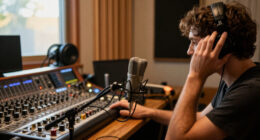
For most DJs who want room to grow, I’d start with the Pioneer DJ DDJ-FLX10: its four-channel layout and broad performance controls suit more demanding sets than entry-level two-deck units. The Denon DJ SC LIVE 4 is a standout for laptop-free, four-deck play, while the Pioneer DJ DDJ-FLX4 is a more approachable pick for learning with a computer. The main tradeoff is between standalone freedom, hands-on control, portability, and beginner guidance. Smaller controllers can be easier to carry and learn, but they offer less room for complex mixes. Read on for how all 15 options compare and which type of DJ each one fits.

Get audio and creator gear delivered free with Prime
- Fast, free delivery on millions of items
- Prime Video, Amazon Music and more included
- Member-only deals all year
Complete the kit



Key Takeaways
- The DDJ-FLX10 and SC LIVE 4 lead for different reasons: the FLX10 prioritizes an expansive computer-based performance setup, while the SC LIVE 4 can run standalone.
- The DDJ-FLX4 is the most balanced starting point in this lineup: it gives new DJs a more conventional two-deck workflow than the very small Party Mix and Inpulse 200 MK3 options.
- Standalone models solve a specific setup problem: the SC LIVE 4 and Numark Mixstream Pro+ reduce reliance on a laptop, at the cost of larger, more specialized equipment.
- Four channels matter when a set actually needs them: the DDJ-GRV6, DDJ-FLX10, and SC LIVE 4 offer more room for layered sources than two-channel controllers, but can add complexity for new users.
- Beginner help and party features are separate priorities: Hercules Inpulse models emphasize learning support, while Numark Party Mix controllers focus on lights and casual home use.
| Denon DJ SC LIVE 4 Standalone 4-Deck DJ Controller |  | Best Standalone Four-Deck Pick | Channels: 4 | Display: 7-inch touchscreen | Internal effects: 17 | VIEW LATEST PRICE | See Our Full Breakdown |
| Hercules DJControl Inpulse 500 2-Deck DJ Controller for Serato and DJUCED |  | Best for Learning Hands-On Mixing | Channels: 2 | Connectivity: USB | Supported software: Serato and DJUCED | VIEW LATEST PRICE | See Our Full Breakdown |
| Pioneer DJ DDJ-REV5 2-Channel Scratch DJ Controller with On-Jog Displays | 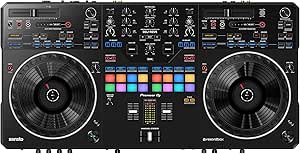 | Best for Scratch and Open-Format Sets | Channels: 2 | Connectivity: USB Type-C | Compatible software: Serato DJ Pro and rekordbox | VIEW LATEST PRICE | See Our Full Breakdown |
| Numark Mixtrack Go Beginner Mobile DJ Controller, Black |  | Best Ultra-Portable Controller | Channels: 2 | Weight: 1.1 pounds | Dimensions: 3.67 × 12.76 × 1.57 inches | VIEW LATEST PRICE | See Our Full Breakdown |
| AlphaTheta Pioneer DJ DDJ-FLX2 2-Channel DJ Controller |  | Best for Phone-Based Beginners | Channels: 2 | Power: USB-C bus power | Audio output: 3.5 mm | VIEW LATEST PRICE | See Our Full Breakdown |
| Numark Party Mix II 2-Deck DJ Controller with Built-In Lights |  | Best for First-Time DJs | Decks: 2 | Performance pads: 4 per deck | Audio interface: Built in | VIEW LATEST PRICE | See Our Full Breakdown |
| AlphaTheta DDJ-GRV6 4-Channel DJ Controller | 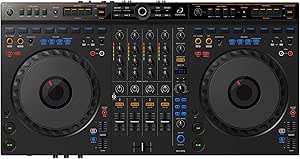 | Best for Club-Style Skill Building | Channels: 4 | Supported software: rekordbox and Serato DJ Pro | Connectivity: USB and auxiliary | VIEW LATEST PRICE | See Our Full Breakdown |
| Numark Mixstream Pro+ Standalone DJ Controller |  | Best for Computer-Free Sets | Display: 7-inch HD touchscreen | Jog wheels: 6 inches | Connectivity: Wi-Fi, Bluetooth audio input, 2 USB ports, and SD media slot | VIEW LATEST PRICE | See Our Full Breakdown |
| Numark Party Mix Live 2-Deck DJ Controller with Built-In Lights and Speakers |  | Best for All-in-One Home Parties | Decks: 2 | Built-in speaker output: 10W | Software: Serato DJ Lite | VIEW LATEST PRICE | See Our Full Breakdown |
| Pioneer DJ DDJ-FLX4 2-Channel DJ Controller, 16 Pads, White |  | Best for Learning a Mainstream Controller Workflow | Channels: 2 | Performance pads: 16 | Connectivity: USB and Bluetooth | VIEW LATEST PRICE | See Our Full Breakdown |
| Pioneer DJ DDJ-FLX10 4-Channel DJ Controller – Black |  | Best for Advanced Performance | Channels: 4 | Compatible software: rekordbox, Serato DJ Pro | Connectivity: USB | VIEW LATEST PRICE | See Our Full Breakdown |
| Numark Party Mix III Beginner DJ Controller with Bluetooth and Lights, Black |  | Best for Casual Parties | Decks: 2 | Connectivity: Bluetooth MIDI, USB-C | Power: USB | VIEW LATEST PRICE | See Our Full Breakdown |
| Pioneer DJ DDJ-FLX4 2-Channel DJ Controller with 16 Performance Pads |  | Best Beginner Upgrade | Channels: 2 | Performance pads: 16 | Connectivity: USB, Bluetooth | VIEW LATEST PRICE | See Our Full Breakdown |
| Pioneer DJ DDJ-REV1 2-Deck Serato DJ Controller |  | Best for Scratch and Open-Format DJs | Decks: 2 | Included software: Serato DJ Lite | Connectivity: USB, auxiliary | VIEW LATEST PRICE | See Our Full Breakdown |
| Hercules DJControl Inpulse 200 MK3 DJ Controller |  | Best for Guided Learning | Channels: 2 | Jog wheels: 2 | Performance pads: 8, with 4 modes | VIEW LATEST PRICE | See Our Full Breakdown |
| mixer controllers for DJ | Weight | Connectivity | Dimensions | Channels |
|---|---|---|---|---|
| Denon DJ SC LIVE 4 Standalone | 13.6 pounds | Wi-Fi, Bluetooth, 2 USB inputs, SD card slot | 15.9 × 28.3 × 3.9 inches | 4 |
| Hercules DJControl Inpulse 500 | 11.6 pounds | USB | 10.54 × 20.26 × 5.12 inches | 2 |
| Pioneer DJ DDJ-REV5 2-Channel | 14 pounds | USB Type-C | — | 2 |
| Numark Mixtrack Go Beginner Mo | 1.1 pounds | Bluetooth MIDI and USB-C | 3.67 × 12.76 × 1.57 inches | 2 |
| AlphaTheta Pioneer DJ DDJ-FLX2 | — | — | — | 2 |
| Numark Party Mix II 2-Deck DJ | 1.76 pounds | — | 7.83 × 12.82 × 2.04 inches | — |
| AlphaTheta DDJ-GRV6 4-Channel | 4.6 kg | USB and auxiliary | 14.8 × 28 × 3 inches (D × W × H) | 4 |
| Numark Mixstream Pro+ Standalo | 8.16 pounds | Wi-Fi, Bluetooth audio input, 2 USB ports, and SD media slot | 11.7 × 22.2 × 2.95 inches | — |
| Numark Party Mix Live 2-Deck D | 2.69 pounds | USB Type B | 18.9 × 20.51 × 17.91 inches | — |
| Pioneer DJ DDJ-FLX4 2-Channel | 2.8 kg | USB and Bluetooth | — | 2 |
| Pioneer DJ DDJ-FLX10 4-Channel | 14.8 lb | USB | — | 4 |
| Numark Party Mix III Beginner | 2.42 lb | Bluetooth MIDI, USB-C | 8.07 × 13.3 × 1.85 in | — |
| Pioneer DJ DDJ-FLX4 2-Channel | 2.8 kg | USB, Bluetooth | 21.3 × 13.3 × 5.1 in | 2 |
| Pioneer DJ DDJ-REV1 2-Deck Ser | 5 lb | USB, auxiliary | 10.6 × 20.7 × 2.33 in | — |
| Hercules DJControl Inpulse 200 | 2.2 lb | — | 15.6 × 10.4 × 3.7 in | 2 |
More Details on Our Top Picks
Denon DJ SC LIVE 4 Standalone 4-Deck DJ Controller
The SC LIVE 4 earns this role for DJs who want four-deck control without making a laptop the center of every set. Its Engine DJ OS, touchscreen, Wi-Fi, and USB and SD media support let it work as a standalone rig, while built-in speakers make quick practice or a small setup easier. Compared with the laptop-dependent Pioneer DJ DDJ-REV5, it offers more freedom from a computer and two extra channels; the REV5 is the more focused choice for scratch-oriented play. The SC LIVE 4 also supports Serato DJ and Virtual DJ, plus 17 internal effects and stem separation. The tradeoff is a larger, heavier unit, and stem functionality requires a separate one-time software license. Streaming features depend on compatible services.
Pros:- Standalone Engine DJ operation with a touchscreen
- Four channels support layered mixes and additional deck sources
- Built-in speakers help with practice and basic monitoring
- Professional XLR main and booth outputs plus USB and SD media support
Cons:- Stem separation requires a separate one-time software license
- At 13.6 pounds and nearly 28.3 inches wide, it is less convenient to transport than compact two-deck controllers
- Streaming access depends on supported services and connectivity
Best for: DJs who want a four-deck home or event setup that can play from media without relying on a laptop
Not ideal for: Scratch-focused DJs seeking a battle-style layout or mobile DJs who need a lightweight controller
- Channels:4
- Display:7-inch touchscreen
- Internal effects:17
- Connectivity:Wi-Fi, Bluetooth, 2 USB inputs, SD card slot
- Audio outputs:RCA and XLR main outputs; 1/4-inch booth output
- Headphone jacks:1/4-inch and 1/8-inch
- Dimensions:15.9 × 28.3 × 3.9 inches
- Weight:13.6 pounds
- Software compatibility:Serato DJ and Virtual DJ
Our verdict“Choose the SC LIVE 4 if standalone four-deck flexibility matters more than a compact footprint or battle-style controls.”
Hercules DJControl Inpulse 500 2-Deck DJ Controller for Serato and DJUCED
The DJControl Inpulse 500 suits new and developing DJs who want physical controls that guide practice without limiting them to toy-like equipment. Its light guides, large touch-detection jog wheels, and filter and FX controls make it easier to learn beatmatching, scratching, and transitions while still leaving room to build technique. Compared with the ultra-portable Numark Mixtrack Go, the Inpulse 500 is much larger and heavier, but its built-in audio interface and hardware input mixer make it a more capable home or gig setup. Sixteen RGB pads add performance options, and retractable feet lift the chassis from the surface. The tradeoff is a two-deck, corded USB design, so it lacks the standalone freedom of the Denon SC LIVE 4 and the Mixtrack Go is easier to carry.
Pros:- Large touch-detection jog wheels support hands-on scratching
- Light guides can help beginners practice timing and transitions
- Built-in audio interface and hardware input mixer add setup flexibility
- Retractable feet lift the controller and help protect its underside
Cons:- Requires a USB-connected computer and corded power
- Its 11.6-pound weight makes it less portable than the Mixtrack Go
- Two-deck layout offers less layering capacity than the four-channel SC LIVE 4
Best for: New DJs learning with DJUCED or Serato who want full-size controls and room to develop scratching and mixing skills
Not ideal for: Traveling DJs prioritizing a very light setup or performers needing standalone playback and more than two decks
- Channels:2
- Connectivity:USB
- Supported software:Serato and DJUCED
- Pads:16 backlit RGB pads
- Jog wheels:Large touch-detection jog wheels
- Audio interface:Built-in
- Dimensions:10.54 × 20.26 × 5.12 inches
- Weight:11.6 pounds
- Warranty:1 year manufacturer
Our verdict“Pick the Inpulse 500 for guided, hands-on learning at home or small gigs when portability and standalone play are secondary.”
Pioneer DJ DDJ-REV5 2-Channel Scratch DJ Controller with On-Jog Displays
The DDJ-REV5 is the clearest fit here for DJs who want a laptop controller built around scratching and battle-style mixing. Its full-size jog wheels and on-jog playback displays keep track position visible during hands-on work, while the layout and DJM-style controls suit open-format routines. It includes Serato DJ Pro and rekordbox, giving it more software choice out of the box than the Hercules Inpulse 500, which supports Serato and DJUCED. The tradeoff is a focused two-channel design: it gives up the four-deck layering and standalone operation of the Denon DJ SC LIVE 4. It also depends on a laptop or PC, so it is less convenient for quick, screen-free practice. This is a purposeful scratch controller, not the most flexible all-purpose option in the group.
Pros:- Full-size jog wheels and battle-style layout suit scratch techniques
- On-jog displays show playback position during performance
- Includes Serato DJ Pro and rekordbox
- Performance pads and DJM-style controls support varied routines
Cons:- Requires a laptop or PC for operation
- Two-channel layout limits simultaneous deck layering compared with the SC LIVE 4
- At 14 pounds, it is not a lightweight travel controller
Best for: Scratch and open-format DJs who perform from a laptop and want full-size jog wheels with visible playback position
Not ideal for: DJs who need standalone playback, four-deck mixing, or a compact controller for frequent travel
- Channels:2
- Connectivity:USB Type-C
- Compatible software:Serato DJ Pro and rekordbox
- Compatible devices:Laptop and PC
- Control inputs:Buttons, dial, touch pad
- Jog wheels:Full-size with on-jog displays
- Included components:USB cable and user manual
- Weight:14 pounds
Our verdict“Choose the DDJ-REV5 for laptop-based scratch and open-format performance if standalone operation and extra channels are not priorities.”
Numark Mixtrack Go Beginner Mobile DJ Controller, Black
At just 1.1 pounds, the Mixtrack Go is the easiest pick in this group to pack for casual practice or a mobile setup. Its touch jog wheels, eight pads per deck, and built-in audio interface give beginners hands-on mixing and headphone cueing in a small package. Bluetooth MIDI and USB-C add connection options, though the controller still depends on compatible software and a host device. Compared with the Hercules DJControl Inpulse 500, the Mixtrack Go is dramatically lighter and slimmer; the Inpulse is the sturdier choice for learning on larger controls and using a hardware input mixer. The Mixtrack Go gives up that physical scale and has only 1/8-inch main and cue outputs, which may constrain more permanent sound setups. It makes sense for portability first, rather than feature depth.
Pros:- Very light at 1.1 pounds and compact for travel
- Bluetooth MIDI and USB-C provide flexible connection options
- Eight performance pads per deck support cue and performance functions
- Built-in audio interface provides speaker output and headphone cueing
Cons:- Requires compatible DJ software and a host device
- 1/8-inch outputs offer fewer connection choices than the XLR and booth outputs on the SC LIVE 4
- Smaller, lighter controls may feel less substantial than the Inpulse 500
Best for: Beginner DJs who need a very light two-deck controller for practice with a phone, tablet, or computer
Not ideal for: Performers who need standalone playback, professional output connections, or larger controls for regular scratch work
- Channels:2
- Weight:1.1 pounds
- Dimensions:3.67 × 12.76 × 1.57 inches
- Connectivity:Bluetooth MIDI and USB-C
- Compatible software:Serato DJ Lite/Pro, Algoriddim djay, VirtualDJ
- Audio outputs:1/8-inch main speaker and headphone cue outputs
- Performance pads:Eight per deck
- Color:Black
Our verdict“Choose the Mixtrack Go if easy packing and beginner practice matter more than a robust mixer layout or professional connections.”
AlphaTheta Pioneer DJ DDJ-FLX2 2-Channel DJ Controller
The DDJ-FLX2 is aimed at beginners who want to start mixing with a phone, tablet, or computer and keep the setup simple. Its USB-C bus power avoids a separate power supply, while Smart Fader adjusts volume, BPM, and bass as the crossfader moves. That assistance can make early transitions more approachable, though it offers less direct control than practicing beatmatching on the Hercules DJControl Inpulse 500, whose light guides support learning on a larger controller. The FLX2 is more compact and can work with rekordbox or djay, with access to supported music services through compatible apps. Its 3.5 mm audio output limits connection choices, and app and service compatibility matters. Choose it for a portable, guided start, not for a professional-output or standalone rig.
Pros:- USB-C bus power supports simple portable setups
- Works with phones, tablets, and computers
- Smart Fader assists with volume, BPM, and bass during crossfader moves
- Supports rekordbox and djay with compatible music services
Cons:- 3.5 mm audio output limits connection options for larger sound systems
- Music service access depends on compatible apps
- Smart Fader guidance may offer less manual practice than the Inpulse 500
Best for: First-time DJs who want a compact controller powered by a phone, tablet, or computer and help with basic transitions
Not ideal for: Gigging DJs who need professional audio outputs, standalone playback, or a controller focused on developing manual beatmatching
- Channels:2
- Power:USB-C bus power
- Audio output:3.5 mm
- Compatible apps:rekordbox and djay
- Supported music services:Apple Music, Spotify, Tidal, and more
- Fader feature:Smart Fader adjusts volume, BPM, and bass
Our verdict“Pick the DDJ-FLX2 for an easy, portable first step into DJing if app compatibility and a 3.5 mm output fit your setup.”
Numark Party Mix II 2-Deck DJ Controller with Built-In Lights
I’d put the Party Mix II near the start of a beginner’s shortlist: its two-deck layout, jog wheels, pads, and filter knobs give new DJs several ways to practice cueing and shaping a mix without a computer-free setup to learn. The built-in audio interface and Serato DJ Lite support make it a straightforward home practice option on Mac or Windows. Compared with the Pioneer DJ DDJ-FLX4, it is smaller and lighter, but the FLX4 offers a broader control surface and more room to build skills on a conventional controller. The Party Mix II’s beat-synced lights add a party effect, though its plastic body and 1/8-inch main output are practical compromises for frequent transport or connecting to more substantial sound systems.
Pros:- Two-deck layout with jog wheels and four performance pads per deck
- Built-in audio interface and Serato DJ Lite support
- Separate headphone and main outputs
- Beat-synced RGB lights add a party effect
Cons:- Plastic construction is less suited to heavy transport
- Main output is a 1/8-inch connector
- Requires a Mac or Windows computer to run its DJ software
Best for: New DJs who want an inexpensive-feeling, compact two-deck layout for learning basic mixing at home.
Not ideal for: DJs who need a sturdy travel controller or a main output suited to more robust sound-system connections.
- Decks:2
- Performance pads:4 per deck
- Audio interface:Built in
- Outputs:1/8-inch main output and headphone output
- Software:Serato DJ Lite
- Compatibility:Mac and Windows
- Weight:1.76 pounds
- Dimensions:7.83 × 12.82 × 2.04 inches
Our verdict“Choose the Party Mix II to learn two-deck mixing with a compact, light-equipped controller, and choose a more substantial option if your setup calls for sturdier construction or different output connections.”
AlphaTheta DDJ-GRV6 4-Channel DJ Controller
The DDJ-GRV6 is the most club-oriented pick in this batch: its four-channel layout, full-size jog wheels, and performance pads give intermediate DJs more room to handle layered mixes than the two-deck DDJ-FLX4. Its CDJ-3000 and DJM-A9-inspired arrangement also makes practicing familiar club-style controls part of the appeal. Groove Circuit adds a different route into remixing, letting DJs bring drum loops from other genres into a set; Serato DJ Pro compatibility adds Stems FX controls. That creative range makes the GRV6 a stronger fit for DJs who want to shape and layer tracks than for someone seeking the simplest first controller. Its platform-specific features depend on compatible software, and its hobbyist-to-intermediate positioning may not meet the needs of DJs looking for flagship gear.
Pros:- Four-channel layout accommodates more layered mixes
- Club-inspired controls support practice with familiar CDJ and mixer arrangements
- Groove Circuit enables live remixing with genre-spanning drum loops
- Supports rekordbox and Serato DJ Pro
Cons:- Platform-specific features depend on compatible DJ software
- Its hobbyist and intermediate positioning may not satisfy DJs seeking flagship gear
- Larger and heavier than compact two-deck options such as the DDJ-FLX4
Best for: Intermediate DJs who want four channels, club-inspired controls, and software-based tools for live remixing.
Not ideal for: First-time DJs seeking a simple two-deck learning controller, or professionals looking for a flagship setup.
- Channels:4
- Supported software:rekordbox and Serato DJ Pro
- Connectivity:USB and auxiliary
- Connector types:TRS and USB
- Dimensions:14.8 × 28 × 3 inches (D × W × H)
- Weight:4.6 kg
- Spare parts availability:EU spare part availability for 5 years
Our verdict“Pick the DDJ-GRV6 if you want a four-channel controller for club-style practice and live remixing, while beginners may find the DDJ-FLX4 easier to approach.”
Numark Mixstream Pro+ Standalone DJ Controller
The Mixstream Pro+ is the clearest choice here for DJs who want to play without bringing a laptop: its standalone operation, 7-inch touchscreen, Wi-Fi, and USB and SD media connections give it a self-contained workflow. The built-in speakers are useful for practice and quick playback, while balanced XLR and RCA main outputs make it more ready for a sound system than the Party Mix II, whose main output is 1/8-inch. The Mixstream Pro+ also offers wireless lighting control and stem separation for tracks prepared in Engine DJ Desktop. That preparation step limits how spontaneous stem use can be, and streaming access depends on provider availability. Buyers who want the simplest beginner controller may prefer the computer-based DDJ-FLX4 over this more feature-rich standalone approach.
Pros:- Standalone operation avoids a laptop during sets
- 7-inch touchscreen provides on-device control
- Built-in speakers support practice and playback
- Balanced XLR and RCA outputs suit sound-system connections
Cons:- Stem tracks must be prepared with Engine DJ Desktop, and a one-time software license purchase applies
- Streaming service access depends on provider availability
- Corded electric power limits where it can be used
Best for: DJs who want a standalone setup for practice or small events, with built-in speakers and multiple media sources.
Not ideal for: Beginners who want a straightforward computer-based controller, or DJs who need prepared stems to work without desktop preparation.
- Display:7-inch HD touchscreen
- Jog wheels:6 inches
- Connectivity:Wi-Fi, Bluetooth audio input, 2 USB ports, and SD media slot
- Audio outputs:Balanced XLR main outs, RCA main outs, 1/4-inch and 1/8-inch headphone outputs
- Microphone input:1/4-inch
- Weight:8.16 pounds
- Dimensions:11.7 × 22.2 × 2.95 inches
- Power source:Corded electric
Our verdict“Choose the Mixstream Pro+ if computer-free mixing and flexible media connections matter more than a simpler, laptop-based controller workflow.”
Numark Party Mix Live 2-Deck DJ Controller with Built-In Lights and Speakers
For casual home parties, the Party Mix Live bundles the parts a beginner may want at once: a two-deck controller, built-in speakers, and beat-synced lights. The speakers mean a practice session or small gathering can start without adding separate monitors, while pads, filter knobs, and two-band EQ give the user hands-on mixing controls. Compared with the Party Mix II, this model adds speakers but is heavier and less clearly focused on a compact practice setup. Its 10W speaker output is best treated as a convenience for nearby listening rather than a replacement for a larger event sound system. The main output is also 1/8-inch, and no battery operation is specified, so portability is limited by both the connection and need for power.
Pros:- Built-in speakers allow practice and playback without separate monitors
- Beat-synced lights add a party effect
- Pads, filter knobs, and two-band EQ provide hands-on mixing controls
- Serato DJ Lite support and streaming service compatibility
Cons:- 10W built-in speakers are limited for larger rooms or events
- Main output uses a 1/8-inch connector
- No battery-powered operation is specified
Best for: Beginners hosting casual home gatherings who want controller, speakers, and lights in one setup.
Not ideal for: DJs playing larger venues, needing battery operation, or connecting to systems that call for other output connections.
- Decks:2
- Built-in speaker output:10W
- Software:Serato DJ Lite
- Connectivity:USB Type B
- Outputs:1/8-inch main output and headphone output
- Weight:2.69 pounds
- Dimensions:18.9 × 20.51 × 17.91 inches
- Color:Black
Our verdict“Pick the Party Mix Live for simple home parties where built-in speakers and lights are useful, but use a stronger sound system for larger events.”
Pioneer DJ DDJ-FLX4 2-Channel DJ Controller, 16 Pads, White
The DDJ-FLX4 suits beginners who want an approachable two-channel layout with features that extend into streaming or microphone mixing. Its Smart Fader adjusts volume, bass, and BPM to help smooth changes between tracks, giving new DJs a guided way to blend while they learn. Compared with the smaller Numark Party Mix II, this model emphasizes a more conventional Pioneer-style control layout and broader device and software compatibility. Bluetooth and USB support also widen how it can connect, though the provided data does not list dedicated XLR or RCA outputs. At 2.8 kg, it is heavier than the Party Mix II, which matters if carrying weight is a priority. Its value is in a familiar learning path, not standalone play or a four-channel setup.
Pros:- Intuitive two-channel layout supports learning controller fundamentals
- Smart Fader helps smooth volume, bass, and BPM changes
- USB and Bluetooth connectivity support multiple devices
- Built-in sound card and microphone mixing support streaming or MC use
Cons:- No dedicated XLR or RCA outputs are listed in the supplied product data
- At 2.8 kg, it is heavier than the compact Party Mix II
- Two channels offer less room for layered mixing than the four-channel DDJ-GRV6
Best for: New DJs who want a two-channel Pioneer-style layout for learning mixing and exploring streaming or microphone use.
Not ideal for: DJs who need standalone operation, four channels, or dedicated XLR or RCA outputs.
- Channels:2
- Performance pads:16
- Connectivity:USB and Bluetooth
- Supported software:Serato and rekordbox
- Compatible devices:djay, rekordbox, and Serato DJ Pro
- Platforms:Android, Windows, iOS, PC, and Mac
- Weight:2.8 kg
- Warranty:1 year manufacturer limited
Our verdict“Choose the DDJ-FLX4 to learn on a familiar two-channel layout with guided transitions, but look elsewhere for standalone play or four-channel mixing.”
Pioneer DJ DDJ-FLX10 4-Channel DJ Controller – Black
The DDJ-FLX10 is the strongest fit here for DJs who want a four-channel setup and hands-on remix tools. Its Track Separation lets you manipulate vocals, drums, and instruments during a set, while the four-channel layout gives you room to layer tracks and effects. Compared with the two-channel DDJ-FLX4, it offers a broader performance setup but asks for more space, budget, and learning time. Large jog wheels with color displays make track information easier to read while mixing, and the DMX output can put lighting control on the same unit. At 14.8 pounds, it is a substantial choice to carry regularly; beginners may also find its range of controls harder to learn than the FLX4’s simpler layout.
Pros:- Track Separation supports live vocal, drum, and instrument manipulation
- Four channels provide room for layered sets
- Jog wheel displays show waveforms and artwork
- DMX output enables direct lighting control
Cons:- At 14.8 pounds, it is less convenient to transport than compact two-channel options
- Its advanced controls can take longer to learn than the DDJ-FLX4
Best for: Experienced rekordbox or Serato DJ Pro users who want four-channel mixing, live stem control, and direct lighting output for performance setups.
Not ideal for: New DJs seeking a lightweight, straightforward controller for learning basic two-deck mixing.
- Channels:4
- Compatible software:rekordbox, Serato DJ Pro
- Connectivity:USB
- Special feature:Track Separation
- Lighting control:Built-in DMX output
- Jog wheels:Large wheels with multicolor displays
- Weight:14.8 lb
- Model year:2023
Our verdict“Choose the DDJ-FLX10 if you want four-channel performance tools and can accommodate its weight and learning curve.”
Numark Party Mix III Beginner DJ Controller with Bluetooth and Lights, Black
The Party Mix III makes a simple home setup feel party-ready: it is USB powered, has beat-synced lights, and supports Bluetooth MIDI for compatible devices. Its two-deck layout, 3-band EQ, and 16 pads cover the basics for learning and casual sets, while Serato DJ Lite and djay support give beginners a way to start mixing. Compared with the Hercules DJControl Inpulse 200 MK3, this Numark adds a built-in light show and Bluetooth MIDI; the Hercules includes speaker and headphone outputs, which may suit a more self-contained monitoring setup. The Party Mix III still needs external speakers or headphones for audio, and its compact controls and beginner focus are less suited to DJs who need room to grow into more demanding performance work.
Pros:- Beat-synced LED lights add a visual element to casual sets
- USB power and 2.42-pound weight make it easy to move
- Bluetooth MIDI supports compatible mobile setups
- 16 performance pads and 3-band EQ provide approachable mixing controls
Cons:- Requires external speakers or headphones for audio monitoring
- Beginner-focused controls offer less room for advanced performance
Best for: First-time DJs who want a light, USB-powered controller for practicing at home or adding simple lighting to casual parties.
Not ideal for: DJs who need built-in speaker monitoring, a larger performance surface, or advanced controls for regular gigs.
- Decks:2
- Connectivity:Bluetooth MIDI, USB-C
- Power:USB
- Audio outputs:RCA main output; 1/8-inch headphone jack
- Performance pads:16
- Mixer:3-band EQ
- Weight:2.42 lb
- Dimensions:8.07 × 13.3 × 1.85 in
Our verdict“Pick the Party Mix III for portable beginner practice and built-in lights, provided you have separate audio gear.”
Pioneer DJ DDJ-FLX4 2-Channel DJ Controller with 16 Performance Pads
The DDJ-FLX4 is a practical first controller for learners who want familiar Pioneer DJ-style controls without moving to a four-channel deck. Smart Fader helps simplify transitions, and the 16 pads provide useful access to cues, effects, beat jumps, and samples as skills develop. Its computer and mobile compatibility offers flexibility for practice at home or on the go. Compared with the Numark Party Mix III, the FLX4 puts more emphasis on a conventional mixing workflow than on built-in party lights. The tradeoff is its two-channel limit, which restricts layered sets, and its 2.8 kg weight makes it heavier than some compact beginner controllers. It makes more sense for someone learning core DJ skills than for a buyer who mainly wants a light show or room for four decks.
Pros:- Smart Fader helps beginners make track transitions
- 16 pads support cues, effects, beat jumps, and sampling
- Works with PC, Mac, iOS, and Android
- Supports compatible streaming and livestreaming workflows
Cons:- Two channels limit layered mixes compared with the DDJ-FLX10
- At 2.8 kg, it is heavier than the Party Mix III
Best for: New DJs who want to learn standard two-channel mixing and use performance pads across computer or mobile setups.
Not ideal for: DJs who want four-channel layering or beginners whose priority is an onboard light show for parties.
- Channels:2
- Performance pads:16
- Connectivity:USB, Bluetooth
- Compatible platforms:PC, Mac, iOS, Android
- Compatible software:djay, rekordbox, Serato DJ Pro
- Dimensions:21.3 × 13.3 × 5.1 in
- Weight:2.8 kg
- Color:Graphite
Our verdict“Choose the DDJ-FLX4 to learn a conventional two-channel workflow with useful pads and broad device compatibility.”
Pioneer DJ DDJ-REV1 2-Deck Serato DJ Controller
The DDJ-REV1 takes a battle-style approach to two-deck mixing, making its layout a better match for scratch practice and open-format sets than the more conventional DDJ-FLX4. Tall pitch faders and quick effect controls put key adjustments within reach, while Serato DJ Lite gives new DJs a starting point in that software. Its compact, five-pound body is also easier to carry than the four-channel DDJ-FLX10. This specialization has a tradeoff: the two-channel design leaves less room for layered mixes, and Serato DJ Lite may not satisfy users who want more advanced software features. The REV1 is most compelling when its battle-inspired layout fits the way you want to mix; buyers focused on general-purpose beginner lessons may find the FLX4’s Smart Fader more approachable.
Pros:- Battle-style layout suits scratching and open-format techniques
- Tall pitch faders and quick effects are easy to reach
- Serato DJ Lite is included
- Five-pound weight makes it easy to transport
Cons:- Two-channel layout limits layered performance compared with the DDJ-FLX10
- Serato DJ Lite may feel restrictive for users seeking advanced software features
Best for: Beginner hip-hop, scratch, and open-format DJs who want a portable Serato controller with a battle-style layout.
Not ideal for: DJs seeking four-channel mixing or a general beginner controller with simplified transitions and broader software options.
- Decks:2
- Included software:Serato DJ Lite
- Connectivity:USB, auxiliary
- Compatible platforms:Mac OS X, Windows
- Dimensions:10.6 × 20.7 × 2.33 in
- Weight:5 lb
- Material:Stainless steel
- Warranty:1 year manufacturer
Our verdict“Pick the REV1 if scratching and open-format mixing matter more to you than extra channels or a general-purpose learning layout.”
Hercules DJControl Inpulse 200 MK3 DJ Controller
The DJControl Inpulse 200 MK3 makes learning the mechanics of DJing its main strength. Beatmatch light guides and tutorials give beginners visual help as they practice syncing tracks, while its eight pads, four pad modes, and stem separation offer ways to explore performance beyond basic blends. Built-in speaker and headphone outputs also make monitoring more direct than with the Numark Party Mix III, which requires external speakers or headphones. The Inpulse is a compact two-channel controller at 2.2 pounds, but that portability comes with a smaller control set than the 16-pad DDJ-FLX4. It suits learners who value instruction and straightforward practice; DJs who already know beatmatching or want more pads and channels may outgrow it sooner.
Pros:- Beatmatch light guides and tutorials support learning
- Stem separation adds creative options for live mixing
- Built-in speaker and headphone outputs simplify monitoring
- At 2.2 pounds, it is easy to carry
Cons:- Two channels restrict layering compared with the DDJ-FLX10
- Eight pads offer fewer direct performance controls than the DDJ-FLX4
Best for: New DJs who want guided beatmatching practice, tutorials, and straightforward speaker and headphone connections.
Not ideal for: Experienced performers or learners who want four channels, a larger pad bank, or more room for complex sets.
- Channels:2
- Jog wheels:2
- Performance pads:8, with 4 modes
- Audio outputs:Master speakers and headphone monitoring
- Hardware interface:3.5 mm audio, USB
- Weight:2.2 lb
- Dimensions:15.6 × 10.4 × 3.7 in
- Software:DJUCED, Serato DJ Lite
Our verdict“Choose the Inpulse 200 MK3 if guided beatmatching and simple monitoring matter more than a larger performance surface.”

How We Picked
I compared these controllers around the decisions that change a DJ setup: whether a laptop is required, how many decks or channels the layout supports, how clearly the controls map to common mixing tasks, and how readily a beginner can learn on the unit. I also weighed portability, built-in entertainment features, and whether the product appears suited to bedroom practice, mobile use, scratching, or more involved performance. Since product names alone do not establish details such as software compatibility or included accessories, buyers should confirm the current manufacturer specifications before purchasing.
The order favors versatile controllers that can serve more than one stage of a DJ’s development, then gives distinct places to specialist and entry-level options. The DDJ-FLX10 ranks highest for hands-on expansion, while the SC LIVE 4 stands out for standalone flexibility; neither is the right fit for every buyer. More compact and guided models rank lower overall because their appeal is narrower, though they may be better choices for a beginner, a small setup, or a party at home.
Factors to Consider When Choosing Mixer Controllers For DJs
Before choosing a controller, I’d match the hardware to the way you plan to practice and perform. A long feature list can obscure practical questions: where your music will come from, how much space you have, and which controls you’ll use often enough to justify the added complexity.
Choose Your Laptop Workflow Before Your Deck Count
Decide whether you want a computer in your setup every time you play. A laptop-based controller can make library management and software-based preparation feel familiar, while a standalone unit can simplify a performance space and reduce cable and screen dependence. Standalone does not mean setup-free: you still need to learn how the unit handles music libraries, updates, and media. A common mistake is buying for a laptop-free ideal without checking how you will prepare and organize tracks. If you already have a reliable computer workflow, the extra standalone capability may not justify the larger footprint. If playing without a laptop is central to your plan, prioritize that before comparing pad counts.
Buy Channels for Your Mixing Habits
Two channels are enough for many DJs mixing one track into another, and the simpler layout can make the first months of learning less cluttered. More channels help when you regularly layer decks, bring in external sources, or build transitions around extra tracks. They also ask you to manage more controls and can take up more room. Do not equate a higher channel count with better sound or better mixing; the layout only helps when your sets use it. Consider what you mix now and what you realistically expect to add, rather than paying in space and complexity for a hypothetical setup. A clear two-channel controller can be a stronger teaching tool than an oversized unit a beginner rarely uses fully.
Check Software and Music Access Together
Controller compatibility shapes more than which program opens: it affects your library habits, preparation routine, and access to any streaming services you might use. Check the current manufacturer information for supported software, operating systems, and included licenses, since these details can change. Also ask whether you need internet access during a set or want to rely on locally stored files. Buyers sometimes focus on the hardware and discover later that their preferred software or music source does not fit the setup. Make this check before comparing cosmetic details or performance pads. If you are learning, pick a workflow you can practice consistently on the computer or device you already own.
Match the Controller to Your Space and Transport
A controller that stays at home can be larger and more comfortable to operate, while a mobile setup benefits from a smaller footprint and fewer pieces to carry. Think beyond the controller’s dimensions: include a laptop, headphones, cables, stand, and any speakers in your transport plan. Built-in lights or speakers may suit casual use, but they do not replace checking whether the sound system meets your needs. A common misstep is choosing the smallest unit based on portability and then finding its controls cramped for regular practice. Conversely, a large four-channel model can be an awkward choice for a desk or small bag. Measure your storage and setup area before committing.
Treat Learning Features as a Shortlist Filter
Beginners benefit from clear control labels, approachable software, and guidance that helps them understand timing and transitions. Those aids can speed up early practice, but they do not replace learning phrasing, beatmatching, and library preparation. Think about whether you want a controller that teaches through prompts or one that gives you a more standard layout to explore independently. If you expect to move between hardware later, familiar controls may be more useful over time than a feature you only use at the start. Experienced DJs may prefer fewer prompts and more direct access to performance controls. Pick the level of guidance that keeps you practicing without making the interface feel restrictive.
Pay for Performance Controls You Will Use
Performance pads, jog displays, and scratch-oriented layouts can make specific techniques quicker to reach, but they are not universal upgrades. A scratch DJ may value a battle-style arrangement, while a DJ focused on long blends may care more about channel access and a comfortable mixer section. Consider the controls you want under your hands during a typical set, not just the ones that look impressive in a specification list. Extra features can add learning time and make a controller less straightforward to share with a new DJ. If you are not sure which performance style suits you, start with a balanced layout and revisit specialist features after regular practice. Spend on tactile access when it solves a real workflow problem.
Frequently Asked Questions
Can I use a DJ controller without a laptop?
Some controllers in this roundup are designed for standalone play, including the Denon DJ SC LIVE 4 and Numark Mixstream Pro+. Many others depend on a connected computer or compatible device and software. Check the exact model’s current specifications, then confirm how it loads and manages music without a laptop. Standalone use can simplify the performance setup, but you still need a plan for preparing tracks and keeping media organized. If you only want to avoid bringing a laptop occasionally, compare that convenience with the extra size and setup requirements of a standalone unit.
Is a four-channel controller a good first controller?
It can be, if you already know you want to layer several decks or use external sources. For many new DJs, two channels make it easier to focus on transitions and learn the mixer layout without unused controls competing for attention. The DDJ-GRV6, DDJ-FLX10, and SC LIVE 4 show how four-channel options serve more involved workflows, but their extra capacity does not automatically make learning faster. Think about the music and techniques you want to practice during your first year. If you cannot name a use for the extra channels yet, a simpler controller may be the more useful starting point.
What should I check before buying a controller for Serato or DJUCED?
Confirm that the specific controller supports the software version and operating system you plan to use, and check whether a license or trial is included. Product listings and software arrangements can change, so manufacturer documentation is the safer source for current details. Also verify that the computer or mobile device you own meets the software’s requirements. If you are comparing controllers, consider the software you already use for playlists and track preparation as well as live mixing. This avoids choosing hardware that fits your budget or layout but disrupts your music workflow.
Do built-in speakers or lights mean I can DJ without other equipment?
Built-in speakers and lights can make a small home session or casual gathering easier to start, as with the Numark Party Mix Live. They do not necessarily replace a speaker system suited to a larger room or an audience. Check the product’s audio connections and the space where you expect to play before relying on built-in sound. Lights add atmosphere, but they do not improve mixing control or make a controller more suitable for every performance setting. If you plan to play outside the home, prioritize the right outputs and a dependable external sound system.
Should I choose the DDJ-FLX4 or a smaller beginner controller?
The DDJ-FLX4 is a stronger fit if you want a more capable two-channel layout for continued practice, while smaller models such as the Numark Party Mix II or Hercules Inpulse 200 MK3 may suit a tight budget, compact space, or a first introduction to DJing. Compare the exact software support and controls before deciding, since beginner products differ in how they teach and what they connect to. Ask whether portability or guidance matters more than room to grow. If you plan to practice regularly, a controller whose layout still feels useful after the basics may save you from upgrading too soon. For occasional casual mixing, a smaller unit may be all you need.
Conclusion
For the broadest hands-on performance setup, I recommend the Pioneer DJ DDJ-FLX10 as the best overall pick; choose the Denon DJ SC LIVE 4 instead if laptop-free four-deck play is your priority. The Pioneer DJ DDJ-FLX4 is my best value-style all-rounder for a two-channel computer-based setup, while the Hercules DJControl Inpulse 500 is a strong beginner choice for someone who values guided learning. For a premium, expandable layout, look at the AlphaTheta DDJ-GRV6 or DDJ-FLX10, depending on the workflow you want. Scratch-focused buyers should compare the DDJ-REV5 and DDJ-REV1; for compact casual play, consider the Numark Party Mix range or Mixtrack Go. Choose the controller that fits the way you will practice and perform, rather than buying channels or effects you do not expect to use.
Halloween Picks
halloween
As an affiliate, we earn on qualifying purchases.




![Iron Maiden Legend Nicko McBrain Turned Down Trump Golf Invite: “[He] Should Be Put In Jail”](https://deadsetlive.com/wp-content/uploads/2026/10/iron-maiden-legend-nicko-mcbrain-turned-down-trump-golf-invite-he-should-be-put-featured-260x140.jpg)