
Hi-Res Audio is a format that offers higher quality sound than standard compressed files like MP3, capturing more detail and nuance from original recordings. It uses formats such as FLAC, ALAC, DSD, or WAV, with larger files that need compatible hardware to access their full potential. Not all devices support Hi-Res Audio, so proper hardware makes a big difference. Keep exploring, and you’ll discover how to get the most out of this advanced sound experience.
Key Takeaways
- Hi-Res Audio uses higher quality formats like FLAC, ALAC, DSD, or WAV to preserve more detail than standard compressed files.
- It offers more accurate sound closer to the original recording, but requires compatible hardware for proper playback.
- Larger file sizes result from increased data content, demanding specialized devices or external DACs for optimal experience.
- Not all devices support Hi-Res Audio natively; proper hardware and software are necessary to unlock its full benefits.
- Hi-Res Audio emphasizes audio fidelity and color accuracy, ensuring sound closely matches the artist’s and producer’s intent.
Have you ever wondered what makes Hi-Res Audio stand out from standard music formats? The answer lies in the way it handles file formats and the playback devices that support it. Unlike typical compressed formats like MP3 or AAC, Hi-Res Audio uses higher quality file formats that preserve more detail from the original recordings. These formats, such as FLAC, ALAC, DSD, or WAV, store audio data with greater bit depth and sample rates. This means you get a more accurate and nuanced sound, closer to what artists and producers intended. However, not every device can play these high-quality files. To truly experience Hi-Res Audio, you need playback devices capable of handling these formats, like specialized digital audio players, high-end smartphones, or dedicated DACs (Digital-to-Analog Converters). If your device only supports standard formats, you won’t notice the difference, no matter how high the file quality is.
When you look at file formats, it’s essential to understand that Hi-Res Audio files are often larger because they contain more data. This extra data translates into richer sound, with more detail in the highs, mids, and lows. But this also means you need compatible playback devices that can process and output this data without losing fidelity. Many smartphones and computers still default to compressed formats or don’t have the hardware to decode Hi-Res files properly. That’s why investing in a good digital-to-analog converter or a dedicated Hi-Res Audio player can make a significant difference in your listening experience. Without the right hardware, even the best files can sound dull or compressed.
Furthermore, not all playback devices are created equal. Some smartphones, laptops, and even some streaming platforms support Hi-Res Audio natively, allowing you to listen at the highest quality available. Others may require you to use specific apps or external equipment. Simply having a high-quality file isn’t enough—you need a device that can decode and output it properly. This is why the ecosystem around Hi-Res Audio is so important. It’s not just about the file format; it’s about ensuring your playback device can handle the data and deliver the full experience. When you choose compatible files and devices, you *gain access to* a richer, more immersive listening experience that reveals details you never knew existed in your favorite tracks.
Additionally, understanding the importance of color accuracy in audio playback can significantly enhance your appreciation of Hi-Res Audio, as it ensures the sound you hear closely matches the original recording.

CIXUN 2x2 USB-C Audio Interface for PC/Mac Recording, 24-bit/192kHz, Dual TS/XLR Inputs, +48V Phantom Power, Studio/Podcast/Streaming (Matte Black)
Plug-and-Play USB Audio Interface for PC and Mac No drivers, no complicated software—just plug in via USB and...
As an affiliate, we earn on qualifying purchases.
Frequently Asked Questions
Does Hi-Res Audio Require Special Headphones or Speakers?
No, hi-res audio doesn’t require special headphones or speakers, but your equipment‘s compatibility influences audio quality. To fully enjoy the higher resolution, you’ll need devices capable of reproducing the enhanced sound. Using regular headphones or speakers may limit your experience, as they might not deliver the full depth and clarity of hi-res audio. Upgrading your equipment ensures you get the best possible audio quality from your hi-res tracks.
Can I Hear the Difference Between Hi-Res and Standard Audio?
You might hear a difference between hi-res and standard audio, especially if your ears are like a finely tuned instrument. I once compared both with high-quality headphones, noticing richer details and clearer sounds in hi-res tracks. While some people perceive hearing differences, others don’t, because audio perception varies. Ultimately, whether you notice a difference depends on your equipment and sensitivity, but it’s worth exploring if you want a more immersive listening experience.
Is Hi-Res Audio Compatible With All Devices?
Hi-res audio isn’t compatible with all devices. You need to verify your device’s compatibility, especially regarding supported file formats like FLAC, DSD, or WAV, which are common in hi-res audio. Many smartphones, laptops, and dedicated high-end audio players support these formats, but some older or basic devices might not. To enjoy hi-res, make sure your device can handle the file formats and has the necessary hardware or software.
How Much More Expensive Is Hi-Res Audio Equipment?
Hi-res audio equipment tends to be more expensive than standard gear, often costing twice as much or more. The cost comparison depends on factors like brand, quality, and features, which influence affordability. You’ll find entry-level options that are more budget-friendly, but high-end systems can be quite costly. Consider your listening needs and budget to determine if the improved sound quality justifies the investment in higher-priced hi-res audio gear.
Does Streaming Hi-Res Audio Consume More Data?
Streaming hi-res audio is like pouring a crystal-clear river into your device, and yes, it does consume more data. These digital file formats, often with less compression, preserve more detail, making the audio richer. However, because of the less aggressive compression algorithms, your streaming will use up bandwidth faster. So, prepare for a data feast if you want that pristine, high-quality sound to flow seamlessly into your ears.

PreSonus AudioBox GO | USB-C Audio Interface for music production with Studio One DAW Recording Software, Music Tutorials, Sound Samples and Virtual Instruments
Ultra-affordable: ultra-compact, versatile USB-C audio interface for home and mobile recording with professional sound quality.
As an affiliate, we earn on qualifying purchases.
Conclusion
So, next time you hear “hi-res audio,” remember it’s like stepping into a grand concert hall, where every note feels alive and real. While it promises clarity and depth, it’s not a magic fix for your music experience. Think of it as a fine brushstroke in a masterpiece, enhancing the artwork without changing its essence. Ultimately, what matters most is how the music makes you feel—whether in high-res or not, it’s your personal symphony.
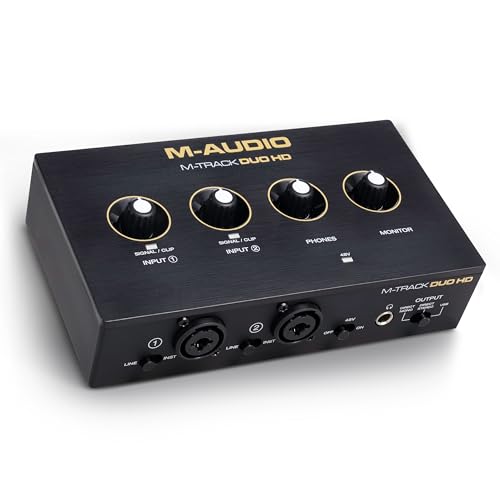
M-AUDIO M-Track Duo HD Audio Interface 24bit 192kHz for Recording, Streaming, Podcasting with USB-C, 2 XLR TRS Inputs, 2 TRS Outputs, Software Suite
Podcast, Record, Live Stream - M-Track Duo HD is a powerful 2-in/2-out USB-C Audio Interface for creating and...
As an affiliate, we earn on qualifying purchases.

MAONO Podcast Equipment Bundle: Audio Interface mixer with Dual XLR Input for Podcast Streaming - MaonoCaster E2 Gen2
Upgraded Podcast Equipment Bundle: Elevate your podcasting, streaming, and studio recording with the E2 Gen2 podcast equipment bundle....
As an affiliate, we earn on qualifying purchases.