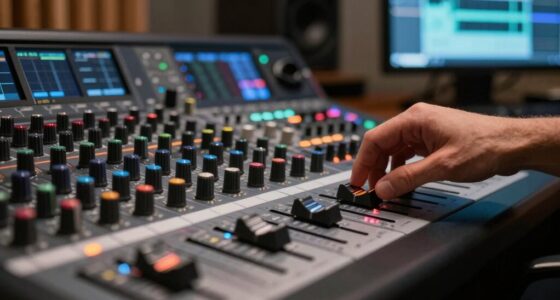

Think of compression like a sound engineer adjusting levels during a live show. They turn down overly loud parts and boost softer sounds to keep the overall audio balanced, so nothing overwhelms or gets lost. This helps maintain clarity and consistency, even with dynamic performances. If you keep exploring, you’ll see how this balancing act makes your audio smoother and easier to understand without losing any important details.
Key Takeaways
- Compression in live shows adjusts loud and soft sounds to create a consistent audio experience.
- It reduces the dynamic range, ensuring loud parts don’t overpower and softer parts remain audible.
- Sound engineers use compressors to manage real-time volume levels, mimicking psychoacoustic effects.
- By controlling peaks, compression allows softer sounds to be heard clearly without distortion.
- This process helps balance sound quality and data efficiency, similar to reducing file size without losing clarity.

Ever wondered how large files or data streams are made smaller without losing important information? That’s the core idea behind compression, and it’s especially relevant in audio. Think about attending a live show. When the band hits a loud chorus, your ears perceive a wide range of volume levels—this is known as the dynamic range. During quieter verses, the volume drops, and during the chorus, it skyrockets. Compression in audio processing works similarly. It reduces the difference between the loudest and softest sounds, making the overall experience more balanced and manageable. But it’s more than just volume control; it’s about understanding psychoacoustic effects, which are how our brains interpret sounds. Our ears don’t perceive all sounds equally; some frequencies are more noticeable than others. Compression algorithms exploit this fact to reduce the size of audio data without making it sound muffled or flat to us. Efficient data handling is essential for streaming high-quality audio over limited bandwidth connections.
Imagine you’re at a concert, and the sound engineer uses a compressor to even out the levels. When the singer hits a high note that’s very loud, the compressor kicks in, lowering that volume so it doesn’t overpower everything else. During softer parts, it gently raises the volume so you can still catch the nuances. This process is akin to reducing the dynamic range of the audio signal. The result is a more consistent listening experience, whether you’re in a noisy stadium or just relaxing at home. From a data perspective, this “compression” means fewer bits are needed to store or transmit the audio, which reduces file size but preserves the sound quality because it leverages psychoacoustic effects—our brain’s tendency to focus on certain sounds while ignoring others.
In essence, compression in audio isn’t about making sounds smaller in a literal sense but about optimizing how sound information is presented and stored. It cleverly balances the loud and soft parts, making the entire experience more efficient and pleasant. When you think about a live show, you can picture the sound engineer adjusting the levels in real time, using compression to keep the audio dynamic range within a manageable scope. This is how compression makes large amounts of data more manageable, all while keeping the essence of the original sound intact. So, next time you listen to music or attend a concert, remember that compression is working behind the scenes to deliver that perfect balance of volume and clarity.

MICNAUX Audio Compressor, Professional Dual-Channel Black Dynamic Processor with Noise Gate & Sidechain Insert for Studio, Live & Streaming – 1U Rackmount, XLR/TRS Inputs
- Dual-Channel Compression: Smooth, natural dynamics control for multiple sources
- Professional Connectivity: XLR and TRS inputs/outputs for seamless integration
- Enhanced Vocal Clarity: VCA circuitry boosts vocal warmth and detail
As an affiliate, we earn on qualifying purchases.
As an affiliate, we earn on qualifying purchases.
Frequently Asked Questions
How Does Compression Affect Audio Quality During Live Performances?
During live performances, compression reduces the dynamic range, making loud sounds quieter and quiet sounds louder. This helps you maintain consistent signal clarity, preventing sudden volume spikes that could overwhelm the audience or sound equipment. As a result, the overall sound stays balanced and clear, allowing you to enjoy a smooth, professional audio experience. Without compression, your live sound might become uneven, distracting, or difficult to hear clearly.
What Are Common Mistakes When Applying Compression in Live Shows?
Like a broken record, many forget to set the threshold correctly, leading to over-compression or under-compression. You might inadvertently squash the dynamic range, making the sound dull or overly harsh. Don’t forget feedback suppression—poorly applied compression can increase feedback risk. Always listen carefully, adjust your settings gradually, and avoid crushing the mix; instead, aim for clarity and balance to make sure your live show sounds professional and engaging.
How Do Different Genres Influence Compression Settings?
Different genres influence your compression settings considerably. For example, rock or metal may need more aggressive compression to keep energy high, while jazz or acoustic performances benefit from gentler settings to preserve natural dynamics. Adjusting these genre-specific settings helps maintain clarity and punch, ensuring your audience stays engaged. Knowing your genre’s typical dynamic range allows you to tailor compression properly, creating a better listening experience and maximizing audience engagement.
Can Compression Be Used to Enhance Crowd Noise?
Yes, you can use compression to enhance crowd noise by managing crowd dynamics and boosting audience engagement. When applied carefully, compression amplifies the loudest crowd sounds, making them more consistent and energetic. This technique helps the audience feel more involved and excited, creating a lively atmosphere. Just be cautious not to over-compress, as it can squash natural dynamics and reduce authenticity, ultimately diminishing the crowd’s spontaneous energy.
What Tools or Equipment Are Best for Live Audio Compression?
You should use compressors with adjustable parameters like attack and release to control live audio effectively. A good choice is a hardware or software compressor that manages dynamic range, ensuring crowd noise stays balanced without overpowering the mix. Set a fast attack to tame sudden loud sounds and a smooth release to maintain natural sound. These tools help you shape the audio, keeping it clear and engaging for your audience.
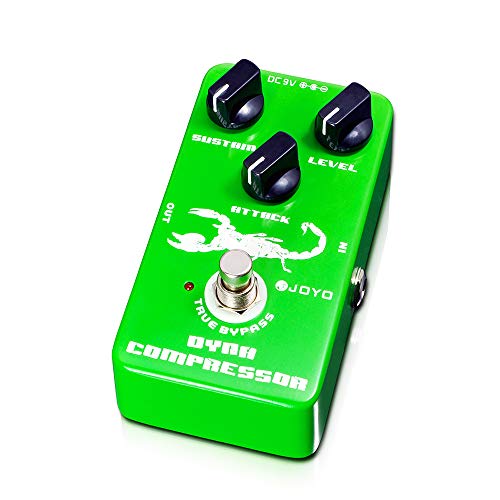
JOYO Dynamic Compressor Guitar Pedal, Transparent Tone with Low Noise, Sustain & Attack Control for Electric Guitar & Bass, True Bypass (JF-10)
- Transparent Analog Compression: Smooth, natural sound enhancement
- 3-Knob Control: Adjust Sustain, Attack, and Level
- Low-Noise Circuit: Ensures clean signal output
As an affiliate, we earn on qualifying purchases.
As an affiliate, we earn on qualifying purchases.
Conclusion
Now that you understand compression, think of it like a live concert where the sound engineer balances the volume so every instrument shines. For example, imagine you’re mixing vocals, and a sudden loud scream threatens to overpower the track. Using compression, you tame that scream, keeping the overall sound smooth and balanced. Next time you listen to your favorite playlist, you’ll appreciate how compression makes everything sound polished—just like a perfectly mixed live show.
MICNAUX Audio Compressor, Professional Dual-Channel Black Dynamic Processor with Noise Gate & Sidechain Insert for Studio, Live & Streaming – 1U Rackmount, XLR/TRS Inputs
- Dual-Channel Compression: Smooth, natural dynamics control for multiple sources
- Professional Connectivity: XLR and TRS inputs/outputs for seamless integration
- Enhanced Vocal Clarity: VCA circuitry boosts vocal warmth and detail
As an affiliate, we earn on qualifying purchases.
As an affiliate, we earn on qualifying purchases.
MICNAUX Audio Compressor, Professional Dual-Channel Black Dynamic Processor with Noise Gate & Sidechain Insert for Studio, Live & Streaming – 1U Rackmount, XLR/TRS Inputs
- Dual-Channel Compression: Smooth, natural dynamics control for multiple sources
- Professional Connectivity: XLR and TRS inputs/outputs for seamless integration
- Enhanced Vocal Clarity: VCA circuitry boosts vocal warmth and detail
As an affiliate, we earn on qualifying purchases.
As an affiliate, we earn on qualifying purchases.