
Tracking force is the downward pressure you apply with the stylus on your records. Setting it correctly is key to protecting your vinyl from damage and ensuring smooth playback. Too light, and the stylus may skip or mistrack; too heavy, and it risks gouging your grooves. Most turntables let you adjust this force, usually with a counterweight. Properly setting it preserves your records and sound quality — keep going to discover more about how to get it just right.

Get audio and creator gear delivered free with Prime
- Fast, free delivery on millions of items
- Prime Video, Amazon Music and more included
- Member-only deals all year
Key Takeaways
- Tracking force is the downward pressure applied by the stylus to the record grooves, crucial for sound quality and record protection.
- Properly setting stylus force prevents skipping, mistracking, and reduces wear on both the stylus and vinyl.
- Use a stylus force gauge and follow the cartridge manufacturer’s recommended weight for accurate setup.
- Incorrect tracking force can cause permanent damage to vinyl grooves or poor audio performance.
- Regularly checking and adjusting tracking force helps maintain optimal sound quality and extend record lifespan.

Have you ever wondered how your turntable produces clear, balanced sound? One of the key factors is setting the correct tracking force, which directly influences how well your records sound and how much they’re protected from damage. Tracking force refers to the amount of downward pressure the stylus applies to the record as it spins. If it’s too light, the stylus may skip or mistrack, causing uneven sound and potential record wear. If it’s too heavy, it can gouge your vinyl, permanently damaging delicate grooves. Finding the right tracking force is essential to preserve your records and guarantee optimal sound quality.
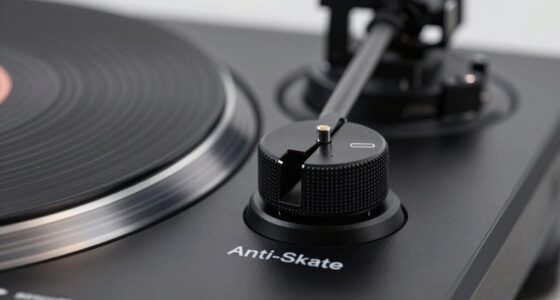
The first step toward achieving the correct tracking force involves paying close attention to stylus pressure. Most turntables come with a built-in or adjustable counterweight that allows you to set this pressure precisely. Using a stylus force gauge makes the process more accurate, helping you dial in the exact weight recommended by your cartridge manufacturer. Applying the correct stylus pressure ensures the stylus makes proper contact with the record grooves without exerting excess force. This balance prevents unnecessary wear on your records and stylus, extending the life of both. Regularly checking and adjusting the stylus pressure is a simple but vital maintenance task that keeps your setup performing at its best. Proper stylus pressure is crucial for maintaining sound quality and record longevity.
Equally important is cartridge alignment, which involves positioning your cartridge correctly in the tonearm. Proper alignment ensures the stylus sits at the ideal angle relative to the record’s grooves, which minimizes distortion and uneven wear. When the cartridge is misaligned, even if your tracking force is perfect, you may still experience poor sound quality and accelerated record wear. The process typically involves using an alignment protractor to set the cartridge’s position so that the stylus hits the record at the correct angle during playback. Correct alignment works hand-in-hand with accurate stylus pressure to deliver clear, balanced sound and protect your vinyl collection.
Frequently Asked Questions
How Often Should I Check and Adjust My Turntable’s Tracking Force?
You should check and adjust your turntable’s tracking force every few months or if you notice record skipping or stylus wear. Regularly monitoring ensures your stylus stays at the ideal weight, preventing damage to your records and prolonging stylus life. If you change cartridges or experience sound issues, recheck the tracking force immediately. Consistent adjustments help maintain sound quality and protect your records from unnecessary wear.
What Are the Signs of Incorrect Tracking Force During Playback?
If your stylus skips frequently or you notice record distortion, your tracking force might be off. Skipping occurs when the stylus doesn’t stay firmly in the groove, while distortion can mean the stylus is pressing too hard or too lightly. These signs indicate you need to verify and adjust your tracking force. Proper setup ensures clear sound and protects your records from unnecessary wear.
Can Improper Tracking Force Damage My Records or Stylus?
Yes, improper tracking force can damage your records and stylus. Too much force causes excessive stylus wear, which leads to a degraded sound quality and potential stylus failure. It can also gouge or scratch your records, causing permanent record damage. On the other hand, too little force results in skipping and poor tracking, risking record scratches and stylus misalignment. Always set your tracking force correctly to protect both your records and stylus.
How Do Different Cartridge Types Affect Optimal Tracking Force?
Different cartridge types do influence the ideal tracking force because of variations in design and stylus compatibility. Heavier cartridges often need more force to track properly, while lighter ones require less. Using the wrong force can cause stylus wear or damage your records. Always check your cartridge specifications and verify your tracking force setting matches, preventing unnecessary stylus wear and ensuring compatibility for the best sound quality.
Is There a Universal Tracking Force Setting for All Records?
There isn’t a universal setting for all records because cartridge compatibility varies, and each record may require a different tracking force. You should always check your cartridge’s recommended tracking force, usually listed by the manufacturer. Using the correct setting protects your records and stylus. While some turntables have adjustable forces, always tailor the setting to your specific cartridge to guarantee the best sound quality and record safety.
Conclusion
Now that you understand tracking force, think of it as the gentle hand guiding your record’s needle through a sea of grooves. When set just right, it’s like a delicate dance, where sound flows smoothly like a whispering breeze. But push too hard or too soft, and the melody falters, crashing like waves against rocks. Mastering this setting keeps your music sailing effortlessly, turning each listen into a voyage across crystal-clear waters.
Halloween Picks
halloween
As an affiliate, we earn on qualifying purchases.