TL;DR

Get audio and creator gear delivered free — and shop member deals
- Fast, free delivery on millions of items
- Access to Prime Big Deal Days deals on October 6–7
- Prime Video, Amazon Music and more included
Wireless microphone systems send audio by radio from a microphone transmitter to a receiver connected to a mixer, camera, or recorder. Choose a system that suits your mic style, local frequency rules, equipment, and number of simultaneous channels, then scan and test it at the venue. Clear frequencies, well-placed antennas, and charged spare batteries help prevent dropouts.
A speaker steps behind a pillar, the sound cuts out, and every head in the room turns toward the silent microphone. Wireless freedom depends on radio planning as much as it depends on the microphone itself.
Wireless microphone systems transmit audio from a microphone to a receiver without a cable connecting the two. Here, you’ll learn how the pieces work, what to check before buying, and how to set up a system that keeps your voice clear across a real room.
Match handheld, lavalier, or headset style to how the speaker will move and use their hands.
Check current local frequency rules and the system’s actual tuning range before buying or touring.
Coordinate all microphones together; channel capacity depends on the gear, venue, spectrum, and planning.
Scan and walk-test the actual space, including areas behind walls or far from the receiver.
Check connector compatibility and battery life, and carry charged spares for live use.
What a wireless microphone system does for you
A wireless microphone system sends sound by radio from a transmitter to a receiver, which feeds a mixer, camera, recorder, or sound system. It frees you to move across a stage or classroom without a cable trailing behind you, and that freedom changes how you work: a trainer can walk between exercise stations, a pastor can step away from the pulpit, and an interviewer can frame shots without hiding wires. The tradeoff is that you inherit the problems of radio — interference, range limits, and batteries — in exchange for mobility.
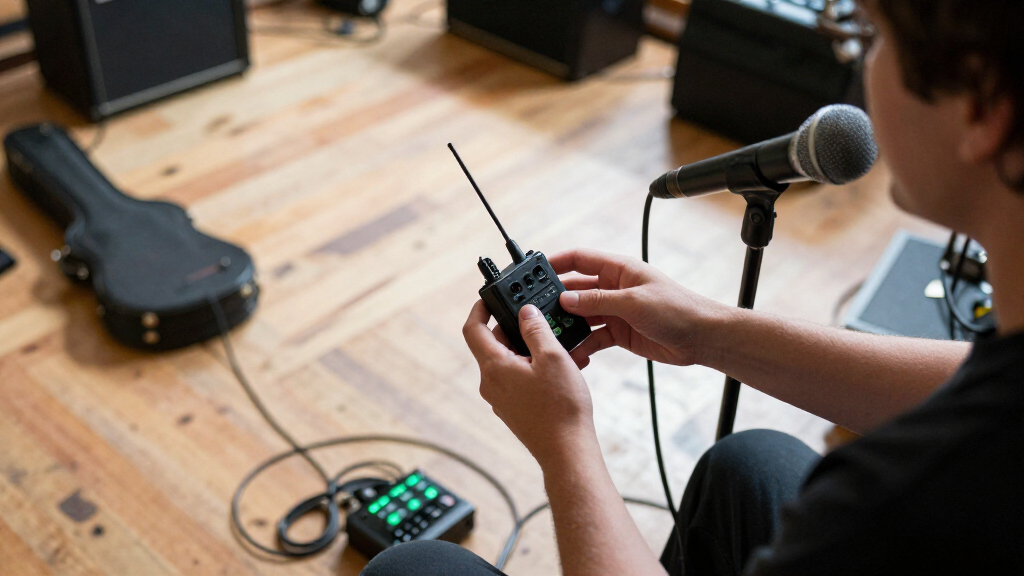
The system has three working parts: the microphone element captures sound, the transmitter sends it, and the receiver turns the radio signal back into audio. In a handheld mic, the transmitter sits inside the microphone, which keeps setup simple but means the whole system rides in the performer’s hand. A lavalier or headset usually plugs into a small bodypack clipped to clothing or a belt, adding a piece to manage but separating the delicate capsule from the electronics.
The microphone element still shapes the sound, just as it does with a wired mic, and this matters because the radio link can never improve what the capsule fails to capture. A dynamic handheld may suit a singer who wants a robust stage mic that tolerates loud sound and rough handling; a small condenser lavalier can look discreet on camera and capture nuance in quieter settings. Think of the radio link as a bridge: it carries the sound faithfully at best, but it doesn’t decide how that sound begins — so budget your attention (and money) accordingly.
Both analog FM and digital systems are common, and the difference has real consequences. Digital models convert sound into data before transmission, which enables features like encryption and often more consistent sound across the operating range; the cost is a small processing delay and typically higher battery drain. Analog systems send a continuously varying radio signal with essentially zero latency, but the audio can degrade audibly as the signal weakens — the classic hiss before a dropout. Neither label guarantees better sound or reliability, so compare specific models against your tolerance for latency, hiss, and battery life.
Pick the mic style that fits your hands, clothes, and movement
Wireless microphone systems work best when the microphone style suits the speaker’s task and movement. A handheld is easy to pass between singers or panelists, a lavalier keeps both hands free for video or presentations, and a headset stays close to the mouth during exercise or dance. If a presenter needs to gesture through a slide deck, a lavalier or headset is often more practical than holding a mic.
Each option has a tradeoff. Handhelds are visible and need a free hand; lavaliers can pick up fabric rustle if they brush against a collar; headsets remain near the mouth but draw more attention. A camera interview in a quiet office may call for a discreet lavalier, while a loud fitness class often benefits from a headset that stays put as the instructor moves.
Compare the connection at both ends before buying. Check that the bodypack accepts the microphone’s connector and that the receiver output works with your camera, mixer, or recorder. A camera may need a particular cable or adapter, and some inputs expect plug-in power, so check the device requirements rather than assuming the plug will fit and work.
Choose a frequency band you can legally use
Wireless microphone systems use radio frequencies, and which ones you can use depends on your country and the equipment’s tuning range. Systems may operate in portions of UHF or VHF, or in license-exempt bands such as 2.4 GHz. These bands behave differently, and the differences matter: UHF generally carries well through walls and across distance, which is why it dominates professional live sound; VHF equipment is often cheaper but more prone to interference; and 2.4 GHz license-exempt gear avoids licensing hassle but shares spectrum with every Wi-Fi router and Bluetooth device in the building — fine for a quiet office, risky in a packed hotel ballroom. Check current national rules and the exact frequencies a system can tune before you buy, especially if you travel between venues or countries.
Older equipment in some 600 MHz and 700 MHz ranges may be restricted or unusable because some countries have reassigned those bands to other services. The implication is practical and expensive if ignored: a banned transmitter doesn’t just perform poorly, it can interfere with licensed services and expose you to fines. A secondhand unit can look like a bargain yet be unsuitable for your location, so read the model’s frequency label and confirm it against current local guidance before money changes hands.
A permitted band still may be crowded at a particular venue. Television broadcasts, mobile networks, Wi-Fi, nearby electronics, and other microphones can compete for radio space — and interference rarely announces itself in advance. Imagine a conference hotel full of presenters, each using a different system: two transmitters landing on the same frequency can produce squelching, crosstalk, or total silence. A quick scan and frequency coordination before doors open can reduce the chance that two transmitters clash, because it replaces guesswork with an actual picture of the radio environment you’ll work in.
There is no universal frequency that works everywhere, and there is no fixed number of microphones every room can support. The available spectrum, equipment, venue, and coordination all affect how many channels can run together, and channels interact: each added microphone consumes not just one frequency but a small zone around it to avoid interference with its neighbors. That is why, if you need several microphones, you should plan the full group as a coordinated set instead of choosing a frequency for each one in isolation — a set of six mics coordinated together may actually fit where six independently chosen ones will not.
Use this five-step setup to prevent dropouts
To prevent common wireless microphone dropouts, coordinate frequencies, position antennas carefully, check power, and test the system throughout the space before the event starts. A mic that sounds fine beside the mixer may behave differently at the far edge of a crowded hall, because bodies absorb radio signals and distance weakens them in ways a quick desk check never reveals. Run this short setup routine before the audience arrives.
- Confirm local rules. Check that your system’s frequency range is allowed where you’ll use it.
- Scan and coordinate. Scan the actual venue for clear frequencies, then coordinate all microphones and related wireless gear together.
- Place the receiver and antennas thoughtfully. Keep a clear path between transmitter and receiver where possible, and follow the manufacturer’s antenna guidance.
- Check power and compatibility. Confirm the transmitter and receiver belong together, check battery status, and bring charged spares for live work.
- Walk the whole area while listening. Test from the stage to the back row, behind likely obstacles, and wherever the speaker will move.
For instance, if the sound vanishes when a presenter steps behind a display wall, try changing the receiver or antenna position and repeat the walk test. Walls, bodies, transmitter placement, and interference can reduce range. Treat a manufacturer’s range figure as an estimate measured in favorable conditions, then trust what you hear in the room.
Good setup also includes checking latency. Digital systems add some processing delay; it is usually small, but a singer monitoring their voice or a production mixing wired and wireless mics may notice it. If performers hear an distracting echo or timing difference, check the system specifications and test the full signal chain before the event.
Balance sound quality, batteries, and extra features
Choose a wireless microphone system for its performance in your real setup, not for a single label like “digital” or “wideband.” Both analog and digital models vary in sound, latency, reliability, range, channel capacity, and compatibility, and those traits pull against each other: a system optimized for long range may carry more latency, and one packed with features may drain batteries faster. A small video crew may value a compact transmitter and quick monitoring, while a theater crew may care more about coordinating several channels reliably — the “best” system is the one whose strengths match your actual failure points.
Battery life is part of the sound plan. A low transmitter battery can interrupt a presentation just as surely as a weak radio link, because many transmitters lose power or distort before they warn you. Check operating time, battery type, charging options, and whether the transmitter reports battery status; for a live show, keep charged spares or a backup power plan ready. The habit matters more than the spec sheet: a system with honest battery telemetry and a fresh-swap routine outperforms a longer-rated system run on stale cells.
Recent systems may offer compact digital transmitters, rechargeable batteries, app-assisted setup, remote control, or monitoring for battery and radio status. These features can save time when you manage several microphones, but “automatic scanning” does not guarantee a clean channel — a scanner only knows the moment it looks, and radio conditions shift as devices and audiences arrive. Scan at the venue, coordinate the equipment, and confirm the result with a real test.
If meetings or broadcasts carry confidential conversations, check whether a digital system offers encryption; without it, a nearby scanner can receive your audio, which is why boardrooms and legal settings treat encryption as essential rather than optional. Also confirm how transmitters and receivers pair: different brands usually don’t work as plug-and-play partners unless they share the required frequency, transmission format, and system protocol — a costly surprise if you buy receivers expecting them to work with existing transmitters. A receiver’s output and your recording device’s input need to match, too.
Frequently Asked Questions
Are wireless microphones as good as wired microphones?
A well-chosen wireless system can provide sound quality comparable to a wired microphone, but the microphone, system, setup, and radio conditions all matter. A wired mic avoids radio interference and transmitter batteries, while wireless gives you room to move. For a fixed desk or studio position, wired may be simpler; for a roaming presenter, wireless can be worth the extra setup.
How many wireless microphones can I use at once?
There is no universal channel count. The number depends on available frequencies, the specific systems, the venue, and frequency coordination. If you need several microphones, coordinate them together at the venue before the event.
Why does my wireless microphone cut out?
Common causes include interference, low batteries, obstacles, excessive distance, poor antenna placement, or a transmitter and receiver that are not compatible. Start with fresh batteries and a new scan, then check antenna and receiver positions while walking the area where you’ll use the mic.
Can I use a wireless microphone with a phone or camera?
Often, yes, if the receiver has an output that suits the device and you use the correct cable or adapter. Check the phone or camera’s input requirements, including whether it supplies plug-in power. Test a recording before filming or going live.
Do wireless microphones need a license?
Sometimes. Licensing depends on your country, the frequency band, and how you use the system. Check current local requirements and the equipment’s tuning range before operating.
Conclusion
Choose your microphone style for the job, confirm that its frequencies are legal and usable where you’ll work, and test it across the actual space. A few minutes of scanning and walking the room can save you from a silent mic and a hundred turning heads.
Fall Picks
fall essentials
As an affiliate, we earn on qualifying purchases.